


Once you’ve started creating customizations for your SalesLogix Mobile, at some point you’ll want to start getting those customizations into production by deploying them or bundling them to add to your production system. This article will walk you through how to do this in both SalesLogix v8 as well as in SalesLogix v7.5.4. You’ll even get a video to follow along through the whole thing.
Background
This video walks through how to add your customizations into Application Architect, bundle them, and deploy them. Take a look at the write-up following the video to see the steps specific to both SalesLogix v8 and SalesLogix v7.5.4.
Steps to Add Customizations To SalesLogix v8
These steps are for adding your customizations to Application Architect in SalesLogix v8. This also assumes you’ve created your customization product using the SalesLogix Mobile Developer Toolkit.
-
In Application Architect, open your SalesLogix Mobile portal
-
Go to the “Custom Modules” tab
-
Click the add (“+”) button
-
Browse for your “module-info.json” file in your customization product (layer)
-
Ensure the checkbox next to you newly listed customization product is checked on the Custom Modules tab
-
Save everything and deploy
Steps to Add Customizations to SalesLogix v7.5.4 (Manual Steps)
These steps are the manual steps for adding your customizations to Application Architect in SalesLogix 7.5.4. These steps work in SalesLogix v8 as well, but the built-in way (outlined above) is far easier. This also assumes you’ve created your customization product using the SalesLogix Mobile Developer Toolkit.
-
In Application Architect, open your SalesLogix Mobile portal
-
In the Support Files tab, under “sourceproducts”, add the same folder structure, along with all files, from your customization product
-
Open the release.jsb2 file under “sourceproductsargos-saleslogixbuild” folder and scroll to the bottom to locate the “resources” section
-
Just ABOVE the “resources” section, there is line with a “],” – just ABOVE that, add the package from the release.jsb2 file in your customization product. In my system, my custom product was named “argos-custom” so it ended up looking like this (also, don’t forget the comma after the “}” above this line):
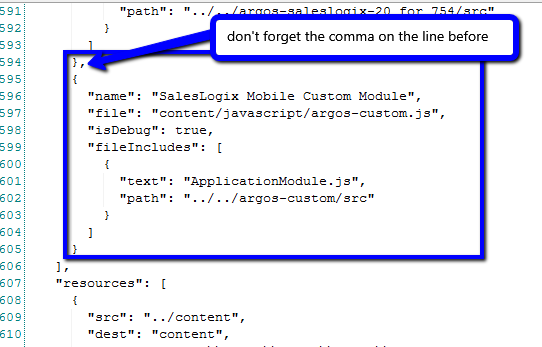
-
Now, copy the resource from the release.jsb2 file in your customized product and paste as an entry in the resources section of the release.jsb2 file in the argos-saleslogixbuild folder as well. Mine looked like this:
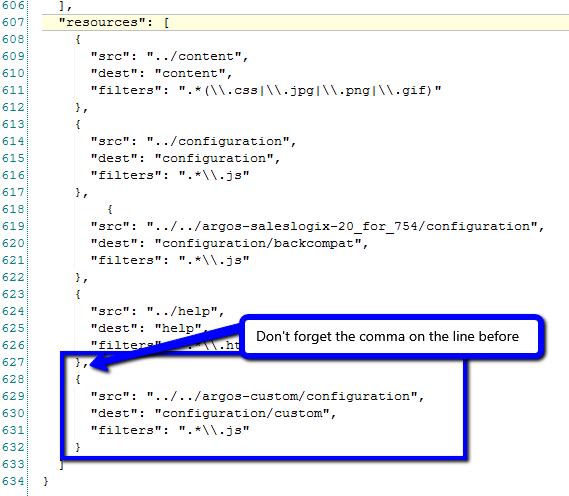
-
Open the index.html file in the argos-saleslogix folder
-
Under the “<!– Modules –>” line, add the following (my custom product is called argos-custom):
<script type="text/javascript" src="content/javascript/argos-custom.js"></script>
-
Now locate the configuration section in the index.html. It starts with “configuration = [” and at the end of that section add a comma and then your configuration (my customization product is named “custom” so it looked like this):
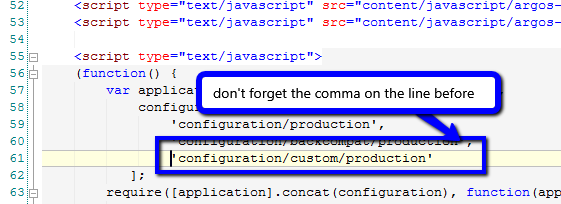
-
Save everything and deploy
What to Include in the Bundle?
In the Support Files tab of the portal, include the following:
-
Your custom product folder
-
The modified release.jsb2 file under the argos-saleslogixbuild folder
-
The modified index.html under the argos-saleslogix folder
All of this might seem like a lot of steps, but once you’ve done this once it becomes much easier. Refer back to the video as needed for the complete walkthrough.


Any idea when there will be an update to the toolkit for Mobile 3?