back to top

Infor CRM (Formerly Saleslogix) Rolling Your Own Resource Files

In my last post I talked about international localization in the Infor CRM web client.  It comes with the 5 standard, but what if you want to roll a new one out?  Well it is as simple as adding new resource files for the pages you want to convert.  The resource files are stored in a subfolder that houses the user control.  They are named in the format of [User Control Name and Extension].[Culture Name].resx.  So for instance the Italian version of the Account Details user control is AccountDetails.ascx.it.resx. The list of culture codes to use can be found all over.  Here is a listing

For custom smart parts you are responsible for creating your own separate resource files if you want to.  For QuickForms you can do the following to add custom ones.

Open the Quick Form you want to apply new cultural localization to.

 

In the upper right you will see “Click to modify form resources” Click It.
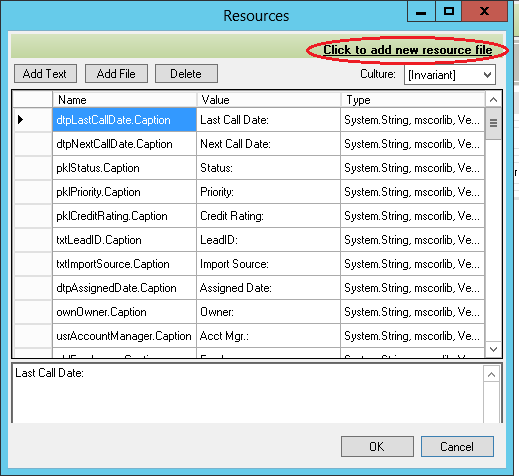
 

 Click the link in the upper right “Click to add a new resource file”.
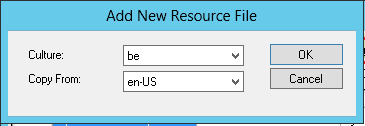
 

Select the new Culture you want to add a localization file for.  Optionally, you can specify an existing resource file in the “Copy From” so you don’t need to start from scratch.

Click OK.  You will be taken back to the previous window to now edit your localization resource file.

That is it!  The next time you build and deploy, you will see a new resource file in the App_LocalResources sub folder  of the SmartPart folder containing whatever quick form you did this against.

A word of warning, if you do make a custom resource file you cant put only some of the keys into it.  When the user control opens it will use the matching culture’s resource file.  If the user control expects a key to exist in that resource file and it doesn’t you will get a run time error and your smart part will not load.


Contact Customer FX for your CRM project
We let our expertise speak for itself - let us know how our all-star team can help on your CRM project
About the Author
Kris Halsrud
Kris Halsrud
Kris Halsrud is a Senior Analyst / Developer for Customer FX Corporation.

LEAVE A REPLY

Please enter your comment!
Please enter your name here

Infor CRM Sync for Exchange: Action Required by August 31, 2026

Using Infor CRM Sync for Exchange with Microsoft 365? Your Exchange administrator must update tenant settings by August 31, 2026 to prevent sync disruption.

[Webinar] What’s Coming Next for Infor CRM SLX and Why v10 Matters

See what’s coming next for Infor CRM SLX, including new marketing workflows, automation improvements, and reasons to consider upgrading to v10.

Disable Caching in Infor CRM SLX Web Client

In the rare case caching is causing issues in the Infor CRM SLX web client, it is possible to disable specific types of caching by making edits using Application Architect, and then deploying.

Exploring AI Options for Infor CRM v10

I've started taking a closer look at the AI capabilities built into Infor CRM v10. Over the next several posts, I'll share what I learn. From the built-in features and supported AI providers to implementation considerations, costs, and practical use cases.

Infor CRM SLX 10.0: Delegate Ownership Changes for “Everyone” Records

Learn how the new EveryoneOwnerAssignment secured action in Infor CRM SLX 10.0 allows designated users to change ownership of Everyone-owned records without requiring Administrator access.

Related Articles

Infor CRM Sync for Exchange: Action Required by August 31, 2026

Using Infor CRM Sync for Exchange with Microsoft 365? Your Exchange administrator must update tenant settings by August 31, 2026 to prevent sync disruption.

[Webinar] What’s Coming Next for Infor CRM SLX and Why v10 Matters

See what’s coming next for Infor CRM SLX, including new marketing workflows, automation improvements, and reasons to consider upgrading to v10.

Disable Caching in Infor CRM SLX Web Client

In the rare case caching is causing issues in the Infor CRM SLX web client, it is possible to disable specific types of caching by making edits using Application Architect, and then deploying.

Exploring AI Options for Infor CRM v10

I've started taking a closer look at the AI capabilities built into Infor CRM v10. Over the next several posts, I'll share what I learn. From the built-in features and supported AI providers to implementation considerations, costs, and practical use cases.

Related Videos