back to top

New Sage SalesLogix Mobile Announced Today


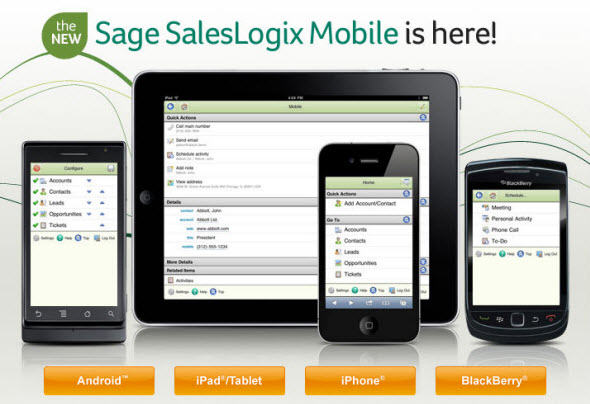
Sage announced the new SalesLogix Mobile solution to Business partners today, based on the HTML5 framework.  The new SalesLogix Mobile will work on all popular smartphones and tablets.  So now we have:


  • SalesLogix iPhone


  • SalesLogix iPad


  • SalesLogix Android


  • SalesLogix Blackberry

Best of all, because of the platform Sage chose, it will be easy to support your users regardless of what type of device they have.  In fact, the same users will be able to use SalesLogix Mobile on multiple devices – say an Android tablet like the Motorola Xoom when they’re at home and their iPhone when they’re out and about.  Pretty cool.  Stay tuned, we have a bunch more info coming.

Contact Customer FX for your CRM project
We let our expertise speak for itself - let us know how our all-star team can help on your CRM project
About the Author
David Tinjum
David Tinjum
Dave is Founder and President of Customer FX Corporation. We all feel sorry for Dave - he's a wanna be geek who can't write a single line of code. How pathetic! Lucky for him, he's surrounded by a whole team of Alpha Geeks. Dave has been an industry insider since 1987 and is called the "Godfather of CRM" by some of his long time peers. He served as Chair of the GoldMine Channel Partner Council from 1993-2000 and Chair of the SalesLogix Business Partner Advisory Council from 1998-2004.

LEAVE A REPLY

Please enter your comment!
Please enter your name here

Infor CRM Sync for Exchange: Action Required by August 31, 2026

Using Infor CRM Sync for Exchange with Microsoft 365? Your Exchange administrator must update tenant settings by August 31, 2026 to prevent sync disruption.

[Webinar] What’s Coming Next for Infor CRM SLX and Why v10 Matters

See what’s coming next for Infor CRM SLX, including new marketing workflows, automation improvements, and reasons to consider upgrading to v10.

Disable Caching in Infor CRM SLX Web Client

In the rare case caching is causing issues in the Infor CRM SLX web client, it is possible to disable specific types of caching by making edits using Application Architect, and then deploying.

Exploring AI Options for Infor CRM v10

I've started taking a closer look at the AI capabilities built into Infor CRM v10. Over the next several posts, I'll share what I learn. From the built-in features and supported AI providers to implementation considerations, costs, and practical use cases.

Infor CRM SLX 10.0: Delegate Ownership Changes for “Everyone” Records

Learn how the new EveryoneOwnerAssignment secured action in Infor CRM SLX 10.0 allows designated users to change ownership of Everyone-owned records without requiring Administrator access.

Related Articles

Infor CRM Sync for Exchange: Action Required by August 31, 2026

Using Infor CRM Sync for Exchange with Microsoft 365? Your Exchange administrator must update tenant settings by August 31, 2026 to prevent sync disruption.

[Webinar] What’s Coming Next for Infor CRM SLX and Why v10 Matters

See what’s coming next for Infor CRM SLX, including new marketing workflows, automation improvements, and reasons to consider upgrading to v10.

Disable Caching in Infor CRM SLX Web Client

In the rare case caching is causing issues in the Infor CRM SLX web client, it is possible to disable specific types of caching by making edits using Application Architect, and then deploying.

Exploring AI Options for Infor CRM v10

I've started taking a closer look at the AI capabilities built into Infor CRM v10. Over the next several posts, I'll share what I learn. From the built-in features and supported AI providers to implementation considerations, costs, and practical use cases.

Related Videos