back to top

SalesLogix 7.5.1 What’s New – Cool Activity Views and Features

What we have here is not new functionality per se but rather a nice improvement to the user experience and a closer match to how the SalesLogix Windows client works making it potentially less of a stretch to make the switch to the web interface. 


Scheduling, completing and generally managing your activities in SalesLogix represents the core “moving parts” of the software at least for a power user anyway.  All of the rest of the data sitting in the system doesn’t really change that much compared to the constant state of change of your activities so I’m glad they decided to spend some time improving this area of the new 7.5.1 web client.


Here is a screen shot of one of the brand new views called the “Summary” view.  It is kind of a hybrid view between the list view and the detail view showing more data about the activity then you could fit on a single line in a grid view.  Several of the fields are also hyperlinks that take you to the linked destination with one click and others pop up a mini window showing the entire contents of the field when you hover your mouse over that area.  This is the kind of web 2.0 stuff that makes you forget you’re running a web app.


Another change is that the activity detail view is now presented as a seperate window over the top of the main window rather then taking up the entire screen.  Again, this is more like the behaviour of the Windows client and you don’t need to take up the entire screen just to show the detail of an activity anyway so this was a good move.


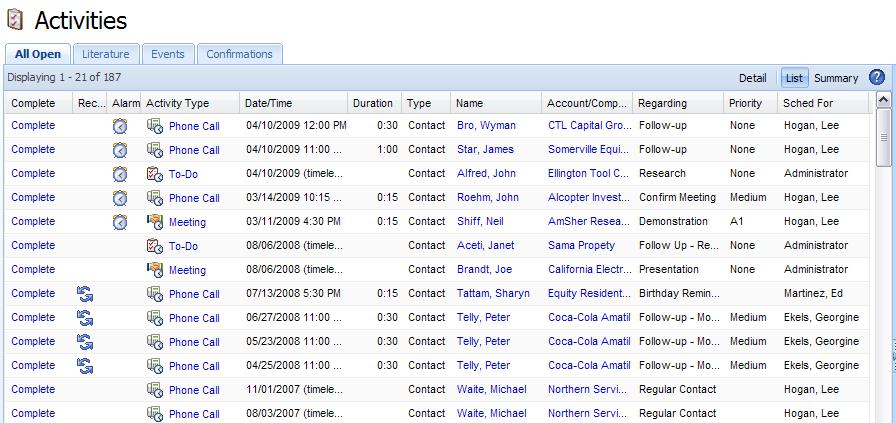
Last but not least, there are some nice changes in the layout and graphics of the activity list view, check it out.
Contact Customer FX for your CRM project
We let our expertise speak for itself - let us know how our all-star team can help on your CRM project
About the Author
Scott Weber
Scott Weber
Scott Weber is CRM Practice Manager and Senior Consultant for Customer FX Corporation.

LEAVE A REPLY

Please enter your comment!
Please enter your name here

Infor CRM Sync for Exchange: Action Required by August 31, 2026

Using Infor CRM Sync for Exchange with Microsoft 365? Your Exchange administrator must update tenant settings by August 31, 2026 to prevent sync disruption.

[Webinar] What’s Coming Next for Infor CRM SLX and Why v10 Matters

See what’s coming next for Infor CRM SLX, including new marketing workflows, automation improvements, and reasons to consider upgrading to v10.

Disable Caching in Infor CRM SLX Web Client

In the rare case caching is causing issues in the Infor CRM SLX web client, it is possible to disable specific types of caching by making edits using Application Architect, and then deploying.

Exploring AI Options for Infor CRM v10

I've started taking a closer look at the AI capabilities built into Infor CRM v10. Over the next several posts, I'll share what I learn. From the built-in features and supported AI providers to implementation considerations, costs, and practical use cases.

Infor CRM SLX 10.0: Delegate Ownership Changes for “Everyone” Records

Learn how the new EveryoneOwnerAssignment secured action in Infor CRM SLX 10.0 allows designated users to change ownership of Everyone-owned records without requiring Administrator access.

Related Articles

Infor CRM Sync for Exchange: Action Required by August 31, 2026

Using Infor CRM Sync for Exchange with Microsoft 365? Your Exchange administrator must update tenant settings by August 31, 2026 to prevent sync disruption.

[Webinar] What’s Coming Next for Infor CRM SLX and Why v10 Matters

See what’s coming next for Infor CRM SLX, including new marketing workflows, automation improvements, and reasons to consider upgrading to v10.

Disable Caching in Infor CRM SLX Web Client

In the rare case caching is causing issues in the Infor CRM SLX web client, it is possible to disable specific types of caching by making edits using Application Architect, and then deploying.

Exploring AI Options for Infor CRM v10

I've started taking a closer look at the AI capabilities built into Infor CRM v10. Over the next several posts, I'll share what I learn. From the built-in features and supported AI providers to implementation considerations, costs, and practical use cases.

Related Videos