


Today we are looking at the the Ticket level reports labeled “Support Escalated Tickets – Sample” and “Support Follow-up – Sample”. Both are from the set of Crystal reports that come standard in a Sage SalesLogix implementation. Both reports use the condition fields of Modify User and Modify Date.
Taking a look at the Support Escalated Tickets report first. When I ran the report there were no additional parameters and it provides the Ticket level data that you would expect to find.
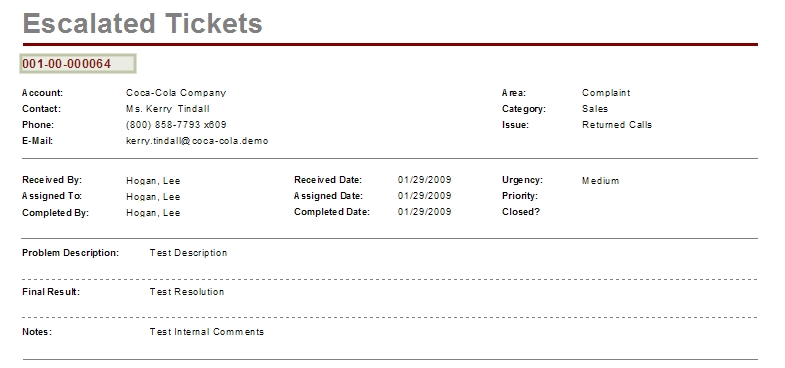
I like the lay out of the report. I noticed the “Priority” and “Closed?” fields are not bringing in data. I think these fields are left over from previous version of SLX. If we removed the two fields and added the TICKET.STATUS field I think you would have everything covered.
Judging from the name of the report, I believe the intent would have been to display a list of Tickets that were received, evaluated, and escalated to the next level of service. What I believed and what this report accomplishes is not near the same. I entered a ticket into the system and it appeared immediately in the report, in fact nothing I did when working the ticket disqualified it from the report. Looking through the report in Crystal I see nothing that qualifies a Ticket record as being escalated. I guess I would expect to see some record selection rule like where Received by is not equal to the Assigned To which might hint that the original caller filtered the call and directed the ticket to another user thus escalating the ticket. It may be that the developer intended for us to build a group and then run this based on the group records. Something to think about when preparing to use this report. This report has been updated, follow this link to see what I did.
Now let’s review the Support Follow-up – Sample report. The report allows you to see a list of Activities that were scheduled in support of resolving the Ticket.
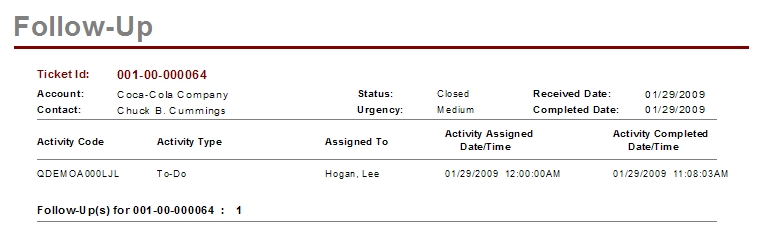
I ran the report and was not prompted for additional parameters. I believe the report fulfill it’s intent but there are some issues. The Activity Code on the far right is actually displaying the Ticket Activity ID which brings no real value to the user, this is also the field the list is being sorted on. I think the Assigned Date would be a better sort field allowing us to see the progress of the resolution. The Activity Assigned and Completed Dates could be formated to just display the dates. There could also be an argument that the Activity description would fit in this list, right now you would have to dig into the ticket to discover what the Activity was about. This report was updated, follow this link to see how.

