back to top

Adding/Modifying system menu items in Sage CRM

By using the Systems Menu functionality, you have the ability to customize the Administration and Main menus in Sage CRM.  As an example, I’m going to add a custom menu item to the main Sage CRM
menu to launch the view to create a new Person record in Sage CRM.

System menus are managed under Administration|Advanced Customization|System Menus.  Once there, select “Main Menu”.

  • Caption – The Text displayed under the menu button
  • Action – Set to “other” for this example
  • System Act – This is the functionality launched by the button.  For this example, I’m using “newperson”
  • Bitmap – The icon that displays on the button
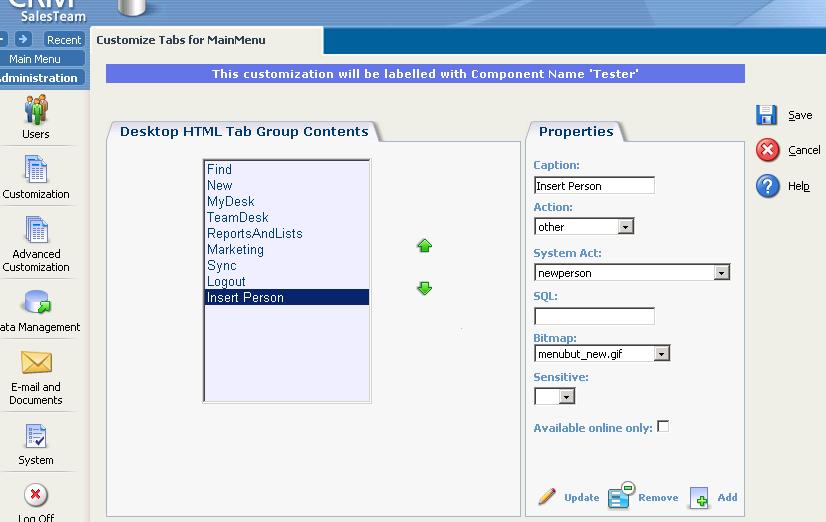
 

Click “Add” to add the new menu item to the main menu, and click “Save” to commit the change.
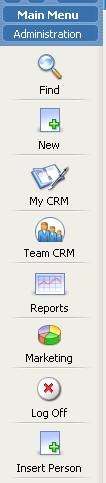
 

That’s all there is to it.  You now can directly create a new Person record from the main menu.  There are many different functionality options that can be launched via a new main menu item.  It’d be worth the time to review the other items under the System Act property to see what else is available.

Hope you find this post helpful.  Thanks for Reading!  [:)]

Contact Customer FX for your CRM project
We let our expertise speak for itself - let us know how our all-star team can help on your CRM project
About the Author
Jason Buss
Jason Buss
Jason is a senior application developer with Customer FX.

1 COMMENT

LEAVE A REPLY

Please enter your comment!
Please enter your name here

Infor CRM Sync for Exchange: Action Required by August 31, 2026

Using Infor CRM Sync for Exchange with Microsoft 365? Your Exchange administrator must update tenant settings by August 31, 2026 to prevent sync disruption.

[Webinar] What’s Coming Next for Infor CRM SLX and Why v10 Matters

See what’s coming next for Infor CRM SLX, including new marketing workflows, automation improvements, and reasons to consider upgrading to v10.

Disable Caching in Infor CRM SLX Web Client

In the rare case caching is causing issues in the Infor CRM SLX web client, it is possible to disable specific types of caching by making edits using Application Architect, and then deploying.

Exploring AI Options for Infor CRM v10

I've started taking a closer look at the AI capabilities built into Infor CRM v10. Over the next several posts, I'll share what I learn. From the built-in features and supported AI providers to implementation considerations, costs, and practical use cases.

Infor CRM SLX 10.0: Delegate Ownership Changes for “Everyone” Records

Learn how the new EveryoneOwnerAssignment secured action in Infor CRM SLX 10.0 allows designated users to change ownership of Everyone-owned records without requiring Administrator access.

Related Articles

Infor CRM Sync for Exchange: Action Required by August 31, 2026

Using Infor CRM Sync for Exchange with Microsoft 365? Your Exchange administrator must update tenant settings by August 31, 2026 to prevent sync disruption.

[Webinar] What’s Coming Next for Infor CRM SLX and Why v10 Matters

See what’s coming next for Infor CRM SLX, including new marketing workflows, automation improvements, and reasons to consider upgrading to v10.

Disable Caching in Infor CRM SLX Web Client

In the rare case caching is causing issues in the Infor CRM SLX web client, it is possible to disable specific types of caching by making edits using Application Architect, and then deploying.

Exploring AI Options for Infor CRM v10

I've started taking a closer look at the AI capabilities built into Infor CRM v10. Over the next several posts, I'll share what I learn. From the built-in features and supported AI providers to implementation considerations, costs, and practical use cases.

Related Videos