


I uncovered an interesting little change introduced in the SalesLogix 7.5 service pack 1 that led me to uncover some strange behavior with how attachments are stored against activities and history in the SalesLogix LAN client.
A customer recently had an issue where as when right clicking on a History record and choosing “View Attachment” they would receive a dialog saying there was no attachment for the selected History record. However, if they opened the History detail and went to the Attachment tab, there was an attachment listed.
The code that runs when the menu items are selected on the History tabs in Accounts, Contacts, and Opportunities is from the Notes History Common VBScript, which is an include file on all of the tab forms. If we look in the ode of this script in SalesLogix 7.5.1 we can see that the following code has been added (Code shown in blue, additional code shown in red):
Sub PopupMenuClick(Sender, Item)
Dim strSQL
Dim objRS
Select Case Item.MenuIndex
…
Case 4 ‘View Attachment
If grdHistory.GetCurrentField = “” Then
MsgBox Application.Translator.Localize(“Please select a record.”),,”SalesLogix”
Else
Set objRS = objDB.GetNewRecordSet
strSQL = “SELECT h.ATTACHMENT, a.FILENAME, a.ATTACHID, a.DESCRIPTION ” & _
“From HISTORY h ” & _
“Inner Join ATTACHMENT a ” & _
“On (h.HISTORYID = a.HISTORYID) OR (h.HISTORYID = a.ACTIVITYID) ” & _
“Where h.HISTORYID = ‘” & grdHistory.GetCurrentField & “‘” ‘DNL
Hmm, strange SQL join going on here. What gives?
Well if we look in the ATTACHMENT table we can see there are two columns contained in the table that join to either an Activity or History record, called ACTIVITYID and HISTORYID.
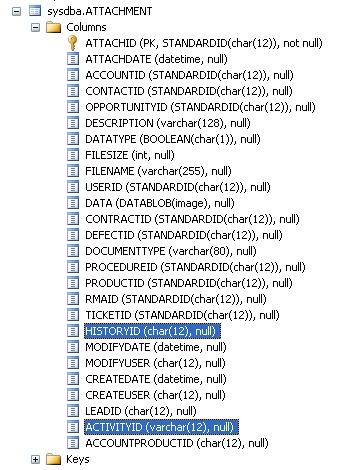
Now if we actually examine the contents of the table we see something a little strange:
select * from attachment where isnull(historyid,”)<>”
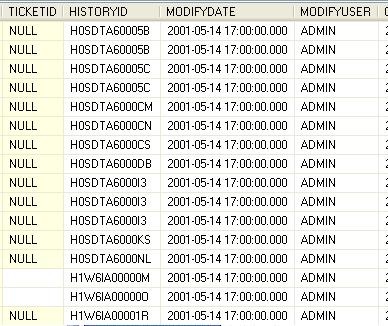
select * from attachment where activityid like ‘h%’


Apparently, from what I can surmise, if you create a new unscheduled History record and add an Attachment the ATTACHMENT record gets created with HISTORYID populated as you would expect. If you create an Activity, then add an Attachment and then complete the Activity the ATTACHMENT record has the ACTIVITYID value of the original scheduled activity replaced by the HISTORYID of the created History record, rather than having the ATTACHMENT row be updated as you would expect (where the ACTIVITYID is cleared and the HISTORYID column is populated).
Rather than correcting the strange behavior of how Attachments get linked to History records, the script mentioned above was adjusted to handle the behavior.
Keep in mind, the ACTIVITY column in the ATTACHMENT table is new as of 7.5.
While this particular code addresses the issue in the LAN, it would not address the potential issue of the web based Entity model where the entities can only be linked in defined relationships using one field. If you needed to have a relationship from HISTORY to ATTACHMENTS (to see all Attachments on a History item in the entity model) you would not be able to use the built in relationship functionality. Instead you would need to build this relationship in code.

