back to top

CRM & Telephony Integration with QGate intelli-CTi™ for Sage SalesLogix – Web Client Integration

QGate intelli-CTi for Sage SalesLogix enables you to optimize your investment in your Sage SalesLogix and Telephone infrastructure -providing a seamless telephony integration with Sage SalesLogix delivered in a cost effective and user friendly manner.


intelli-CTi for Sage SalesLogix enhances profitability through increased productivity and customer satisfaction


QGate intelli-CTi Family benefits:


  • Streamlined telephony activity within your business

  • Improved customer relationships, service levels and customer satisfaction

  • Increased telephone call efficiency and throughput

  • Personalized telephone interaction – identifying callers automatically

  • Increased business productivity

  • Reduced development costs with ease of deployment and implementation

  • Flexible deployment across multiple sites

Contact Customer FX for further information.


QGate intelli-CTi for Sage SalesLogix Web Client key features include:


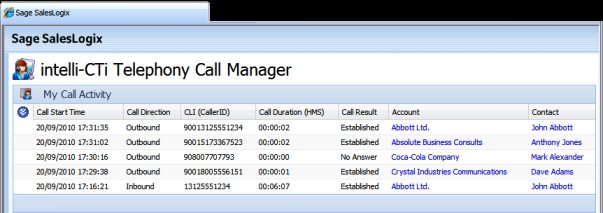
  • Delivering great customer service by the instant retrieval of Account and Contact information in Sage SalesLogix when a telephone call is received.

  • Automating the dialing of Sage SalesLogix Accounts, Contacts and Leads.

  • Increasing productivity by improving the speed and accuracy of outbound calling with one-click dialing from within Sage SalesLogix.

  • Automatic recording of telephone call statistics, combined with associated customer data to enable valuable analysis and business intelligence.

  • Automatic logging of telephone call information within Sage SalesLogix for audit tracking, performance analysis and complete CRM call history management.

  • Telephone system independent with a wide range of telephone systems supported, including TAPI, TSAPI, CSTA, MiTAI, OAI and more, including Voice Over IP (VOIP) solutions.

  • Seamless integration into Sage SalesLogix.

  • Elegant desktop integration with dynamic active sidebar display.

  • On-screen call display (soft-phone) with full call handling capability.

  • Multiple telephone call support.

  • In-call note capture capability.

  • Rapid implementation.

  • Flexible and extendable framework solution – intelli-CTi has been future-proofed with its open and flexible design. For example, if the environment changes or the phone system is upgraded, the solution will not need re-engineering.

  • Multi-site CRM deployment with multi-telephone system support.

Contact Customer FX for your CRM project
We let our expertise speak for itself - let us know how our all-star team can help on your CRM project
About the Author
Scott Weber
Scott Weber
Scott Weber is CRM Practice Manager and Senior Consultant for Customer FX Corporation.

LEAVE A REPLY

Please enter your comment!
Please enter your name here

Infor CRM Sync for Exchange: Action Required by August 31, 2026

Using Infor CRM Sync for Exchange with Microsoft 365? Your Exchange administrator must update tenant settings by August 31, 2026 to prevent sync disruption.

[Webinar] What’s Coming Next for Infor CRM SLX and Why v10 Matters

See what’s coming next for Infor CRM SLX, including new marketing workflows, automation improvements, and reasons to consider upgrading to v10.

Disable Caching in Infor CRM SLX Web Client

In the rare case caching is causing issues in the Infor CRM SLX web client, it is possible to disable specific types of caching by making edits using Application Architect, and then deploying.

Exploring AI Options for Infor CRM v10

I've started taking a closer look at the AI capabilities built into Infor CRM v10. Over the next several posts, I'll share what I learn. From the built-in features and supported AI providers to implementation considerations, costs, and practical use cases.

Infor CRM SLX 10.0: Delegate Ownership Changes for “Everyone” Records

Learn how the new EveryoneOwnerAssignment secured action in Infor CRM SLX 10.0 allows designated users to change ownership of Everyone-owned records without requiring Administrator access.

Related Articles

Infor CRM Sync for Exchange: Action Required by August 31, 2026

Using Infor CRM Sync for Exchange with Microsoft 365? Your Exchange administrator must update tenant settings by August 31, 2026 to prevent sync disruption.

[Webinar] What’s Coming Next for Infor CRM SLX and Why v10 Matters

See what’s coming next for Infor CRM SLX, including new marketing workflows, automation improvements, and reasons to consider upgrading to v10.

Disable Caching in Infor CRM SLX Web Client

In the rare case caching is causing issues in the Infor CRM SLX web client, it is possible to disable specific types of caching by making edits using Application Architect, and then deploying.

Exploring AI Options for Infor CRM v10

I've started taking a closer look at the AI capabilities built into Infor CRM v10. Over the next several posts, I'll share what I learn. From the built-in features and supported AI providers to implementation considerations, costs, and practical use cases.

Related Videos