


A question was asked in the SalesLogix Business Partner newsgroups about how you would go about adding the Primary Contact for an account to the AccountDetails form. I thought this was a great idea for a post since there are many ways to go about doing this, some of them better than others. Your first reaction might be to write some code on the form, in a LoadAction, to set a control with the value of the account’s primary contact. However, you’ll find that you have the easiest time, now – and when it comes time to upgrade, if you keep things in the entity model as much as possible. Wouldn’t it be nice if we had a property on the account that returned the primary contact so we could just use normal binding to display it where needed, on any form without writing the code over and over again to retrieve the primary contact? We can do just that if we implement this using a custom property on the Account entity.
In the AA, drill down to the Account entity. Then right-click on the Properties folder under it an select the “New Custom Property” menu item. You’ll get a screen where we can add code for this custom property. Set the following for the custom property:
- Property Name = “PrimaryContact“
- Read Only
- Return Type = “Sage.Entity.Interfaces.IContact“ (you’ll just have to type it in, it won’t be listed in the drop-down)

Now we’ll add the following code to our new PrimaryContact custom property:
public virtual Sage.Entity.Interfaces.IContact PrimaryContact
{
    get
    {
        Sage.Entity.Interfaces.IContact primarycontact = null;
        foreach (IContact contact in this.Contacts)
        {
            if (contact.IsPrimary.HasValue && contact.IsPrimary.Value)
            {
                primarycontact = contact;
                break;
            }
        }
        return primarycontact;
    }
}
This code is easy enough, but the cool part is that this will now be a part of the Account entity. We won’t have to write it ever again, and to display the Primary Contact for an Account, we can jus bind it up. Note that we made this property ReadOnly. We could make this a read/write property, we’d just have to implement the code in the “set” property to set the IsPrimary flag on the contact passed in. Also, it is worth pointing out, that booleans in SalesLogix are almost always of type bool? (a nullable bool), not just a standard bool. This means that you need to not only check if the IsPrimary property is true, but also check that it has a value (so you don’t get an error if you come accross a contact with a null value for IsPrimary).
To use this custom property on a form we will need to build the interfaces for our platform. Once that is done, open the AccountDetails form. We will add a new control on the form that is a “Link” control. We will need to set a property on this Link control to tell it that we’ll be linking to a Contact. Set the Link control’s “EntityType” property to “Contact”. Then open the DataBindings. Here we will set two bindings:
- EntityId = MainEntity.PrimaryContact.Id (Note, you’ll need to map to the new PrimaryContact property on the account, just select it from the left side and click “Map“. Then type in “.Id“ at the end of it – see screenshot below)
- Text = MainEntity.PrimaryContact

Once you’re done there, save the form. Remember, now that you’ve added this custom property to the Account entity, you can use this where ever you want, on any account screen (or easily grab the primary contact via code using account.PrimaryContact)
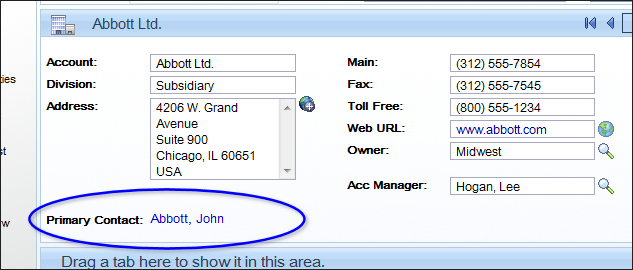
Time to take a look. Build the web platform, then deploy the site. The result will look like this (you’ll also be able to click it to jump to the primary contact since we used a Link control for this):
Enjoy 🙂


Thanks for sharing this.