


A client recently posed a question to me regarding if you can customize the SalesLogix grid in the LAN client to have coloring applied based upon conditions. The answer is yes you can. lets take a look at how.
The SalesLogix data grid control has an event called OnCustomDrawCell. This event has several arguments that are passed in including:
- Sender- the grid control
- Node- The row in the grid
- Column- The column being rendered
- IsSelected- A boolean expressing if the cell is selected
- IsFocused- A boolean expressing if the cell is currently in focus
- Text- Writable property relating to the text displayed in the grid
- Color- Writable property relating to the background color of the cell displayed in the grid
- Alignment- Writable property relating to the text alignment in the grid
- Font- Writable property relating to the text’s font displayed in the grid
- FontColor- Writable property relating to the text’s color displayed in the grid
Lets take a look at how we might examine the contents of a given row, and then based on that information do something to another cell:
Sub grdContactsCustomDrawCell(Sender, ByRef Node, ByRef Column, IsSelected, IsFocused, ByRef Text, ByRef Color, ByRef Alignment, ByRef Font, ByRef FontColor)
Dim sFieldName
Dim vName
Dim lColumnIndex
Dim vIDsFieldName = UCase(Column.FieldName) ‘ Field you want to look for
Select Case sFieldName
Case “ISPRIMARY” ‘ ALIAS name of the column in QB
lColumnIndex = GetColumnIndexByFieldName ( grdContacts,”NAMELF” ) ‘ Used so that grid can be sorted/grouped
vName = Node.Values ( lColumnIndex ) ‘ Gets the actual valueIf Not IsNull ( vName ) Then ‘ Ensure you check for Nulls
Select Case ucase(left(vName,1))
Case “A”
Color = rgb(255,0,0)
Font.Bold = True
FontColor = rgb(0,255,0)
End Select
End If
End Select
End SubFunction GetColumnIndexByFieldName ( ByRef Grid, ByVal FieldName )
Dim i
Dim lColumnIndexlColumnIndex = -1
For i = 0 To Grid.Columns.Count – 1
If UCase ( Grid.Columns(i).FieldName ) = UCase ( FieldName ) Then
lColumnIndex = i
Exit For
End If
Next
GetColumnIndexByFieldName = lColumnIndex
End Function
In the code above we have a case statement that is looking to see if the column of the cell being rendered is the “ISPRIMARY” column.
Select Case sFieldName
Case “ISPRIMARY” ‘ ALIAS name of the column in QB
lColumnIndex = GetColumnIndexByFieldName ( grdContacts,”NAMELF” ) ‘ Used so that grid can be sorted/grouped
vName = Node.Values ( lColumnIndex ) ‘ Gets the actual value
If it is it then uses the function GetColumnIndexByFieldName which retruns the column index of a different column we want to find. In this example we re finding the index position of the “NAMELF” column. With that index position identified we can then use the Node.Values() function to fetch the value in the column index position specified.
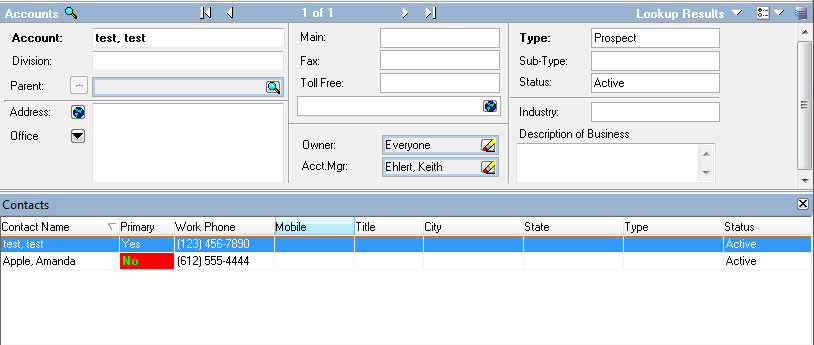
With the Name value having been captured, we can then do something with with it. In our example we are looking to see if it starts with “A”. if it does then we are setting things like the Color, Font.Bold, and FontColor.
The end result is a grid with color coding:
One last thing. Suppose you want to get data related to the record but not necessarily in the grid. Well if you want to get the ID of the record that is being rendered you can use something like this:
vID = sender.GetCurrentField(sender.KeyField) ‘Gets the primary keyfield of the current row.
Note: this code does run per cell that is rendered so it can increase the time to render the grid, especially if you are loading a grid with lots of records.


Is there a way to force the CustomDrawCell method to be called without having to reload all the data and not call it directly?