


I have been working through each of the Crystal reports that come with an standard Implementation of Sage SalesLogix. In previous posts I have reviewed each of the reports and lately I have been working through each making adjustments and hopefully improving functionality. All posts contain links on where the modified report can be downloaded for free.
Today we start working on the History Family of Reports. On December 16th 2008, I wrote a blog post on the SalesLogix History Reports. In the post I wrote the following on the History by Account Crystal Reports.
Start Excerpt………………..
The first is the History by Account. This report does a good job of breaking down History to the Contact level. You are provided a report parameter for including the History Notes. The sort for the report is alphabetical by Account, by Contact last name, and then by date with the latest record displaying first. This is a pretty nice report, there are only two items I can come up with as improvements.
The field used to display the notes is the HISTORY.NOTES field which is a string with only 255 characters, this is automatically populated through the completion of an Activity. I have said it before, it would be nice to have the option to see the actual notes stored in the HISTORY.LONGNOTES (memo) field.
The value of duration is presented in minutes. Most reports I have worked with where duration is wanted, I have been asked to calculate minutes into hours and then minutes which is easier for the reader of the report. We could even have the formula set to figure out days. 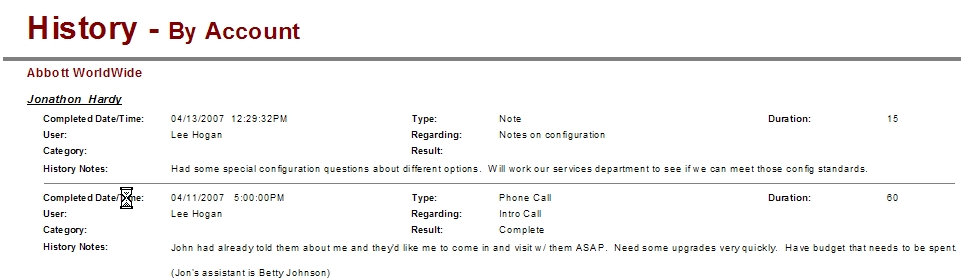
End Excerpt………………….
As I have done before for History related reports in the Account and Contact layers. I will also change the layout of this report from Landscape to Portrait to clean up the white space. And I added a parameter field that allowed the user to filter out database changes. After adding the Long Notes field I wrote a suppression formula and called a label if the field was empty. The only thing that I will do to this report that I haven’t done in previous posts is change the duration field to read as hours and minutes. For this functionality we will need to write 3 new formulas. One formula that formats the data with the history record and two used in summary and the Contact levels. The first one will be labeled Duration and the following is the formula I created:
if {HISTORY.DURATION} >59 then
if {HISTORY.DURATION}/60 < 10
then Left(CStr({HISTORY.DURATION}/60),1)+” Hour(s) ” +
if (left(CStr(Remainder({HISTORY.DURATION},60)),2) + ” Min”) = “0. Min”
then “”
else left(CStr(Remainder({HISTORY.DURATION},60)),2) + ” Min”
else Left(CStr({HISTORY.DURATION}/60),2)+” Hour(s) ” +
if (left(CStr(Remainder({HISTORY.DURATION},60)),2) + ” Min”) = “0. Min”
then “”
else left(CStr(Remainder({HISTORY.DURATION},60)),2) + ” Min”
else
if (Left(CStr({HISTORY.DURATION}),2)+ ” Min”) = “0. Min”
then “None”
else Left(CStr({HISTORY.DURATION}),2)+ ” Min”
Basically the formula evaluates whether the duration is at least an hour, if it is the formula then evaluates if the hours are in the double digits. Once the path is chosen I take the duration and divide it by 60 which gives me the number of hours, the left function then separates out the hours from the minutes. I then uses the Remainder function to provide the minutes. Finally, I added some rules on how to display if there weren’t any minutes.
The other two formulas were labeled Duration Account and Duration Contact and use basically the same formula in each but I replaced the {History.Duration} field with the summary for the Contact and then the Account.
I think it came out fairly nice.

The History By Account report is available for free download here!
Get all of our Free SalesLogix Reports here…

