back to top

Populating AutoComplete Strings

I recently had a project which required me to populate the strings collection in an AutoComplete control from data contained in the database.  I wanted to take a second to outline how I populate the control’s strings, as well as create a reusable script to simplify the process in the future.


The FillAutoCompleteString method I’ve created is pretty simple.  It accepts parameters for the control name, as well as Select, from and where clauses to build a SQL statement.  (The Where parameter is optional, but you do need to pass at least a blank string.)


The method simply loops through a recordset based on the SQL parameters provided, and writes each item to the autocomplete control.


Sub FillAutoCompleteString(ByRef objControl, ByVal strSelect, ByVal strFrom, ByVal strWhere)
Dim objNames
Dim sSql

    objControl.Strings.Clear

    Set objNames = CreateObject(“ADODB.Recordset”)
    With objNames
         Set .ActiveConnection = Application.GetNewConnection
         .LockType = 1 ‘adLockReadOnly
         .CursorLocation = 3 ‘adUseClient
         .CursorType = 0 ‘adOpenForwardOnly
         sSql = “select ” & strSelect & ” from ” & strFrom & ” product”
         If Len(trim(strWhere & “”)) > 0 Then
            sSql = sSql & ” where ” & strWhere
         End If
         .Open sSql

         While Not (.BOF or .EOF)
            objControl.Strings.Add(.Fields(strSelect).Value & “”)
            .MoveNext
         Wend
        .Close
    End With

    Set objNames = Nothing

End Sub


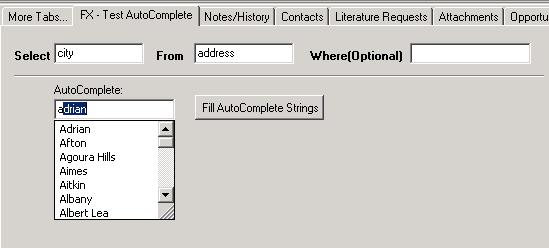
I put together a simple test form to check out the functionality.  After adding a “Select” and “From” value, clicking the Fill AutoComplete Strings button will add those items to the Autocomplete control.  The user will now be presented with a list of potential items, based on the characters they’ve entered.


Obvously, querying the database in this way can be slow if dealing with an exceptionaly large database, so keep that in mind.  Otherwise, feel free to use this code in your own implementations.  Thanks for reading!  [:)]

Contact Customer FX for your CRM project
We let our expertise speak for itself - let us know how our all-star team can help on your CRM project
About the Author
Jason Buss
Jason Buss
Jason is a senior application developer with Customer FX.

LEAVE A REPLY

Please enter your comment!
Please enter your name here

Infor CRM Sync for Exchange: Action Required by August 31, 2026

Using Infor CRM Sync for Exchange with Microsoft 365? Your Exchange administrator must update tenant settings by August 31, 2026 to prevent sync disruption.

[Webinar] What’s Coming Next for Infor CRM SLX and Why v10 Matters

See what’s coming next for Infor CRM SLX, including new marketing workflows, automation improvements, and reasons to consider upgrading to v10.

Disable Caching in Infor CRM SLX Web Client

In the rare case caching is causing issues in the Infor CRM SLX web client, it is possible to disable specific types of caching by making edits using Application Architect, and then deploying.

Exploring AI Options for Infor CRM v10

I've started taking a closer look at the AI capabilities built into Infor CRM v10. Over the next several posts, I'll share what I learn. From the built-in features and supported AI providers to implementation considerations, costs, and practical use cases.

Infor CRM SLX 10.0: Delegate Ownership Changes for “Everyone” Records

Learn how the new EveryoneOwnerAssignment secured action in Infor CRM SLX 10.0 allows designated users to change ownership of Everyone-owned records without requiring Administrator access.

Related Articles

Infor CRM Sync for Exchange: Action Required by August 31, 2026

Using Infor CRM Sync for Exchange with Microsoft 365? Your Exchange administrator must update tenant settings by August 31, 2026 to prevent sync disruption.

[Webinar] What’s Coming Next for Infor CRM SLX and Why v10 Matters

See what’s coming next for Infor CRM SLX, including new marketing workflows, automation improvements, and reasons to consider upgrading to v10.

Disable Caching in Infor CRM SLX Web Client

In the rare case caching is causing issues in the Infor CRM SLX web client, it is possible to disable specific types of caching by making edits using Application Architect, and then deploying.

Exploring AI Options for Infor CRM v10

I've started taking a closer look at the AI capabilities built into Infor CRM v10. Over the next several posts, I'll share what I learn. From the built-in features and supported AI providers to implementation considerations, costs, and practical use cases.

Related Videos