


I have found what appears to be a bug in 7.5.2 and the handling of external assemblies referenced for use in SalesLogix code, like business rules, events, custom properties, etc. I had a system that had multiple external assemblies handling some global business rules that were shared across multiple entities in the SalesLogix web portal. After upgrading to 7.5.2 I could no longer do a full build on the system. I would get the following error:
ERROR – C:UsersboboAppDataRoamingSagePlatformOutputSage.SnippetLibrary.CSharpsrcSage.SnippetLibrary.CSharp.@.296d53c4-46bb-4baa-a4f5-44f57dec9720.codesnippet.cs(47,13):The name ‘XXX’ does not exist in the current context
The rule that uses the assembly does have a reference to the assembly and worked fine in 7.5.1. I tried removing the reference and re-adding in the business rule. In the actual code file, the intellisense in the Application Architect code editor detects the assembly and its various classes and methods. However every rule, event, custom property, etc. that uses this external assembly failed with the same error.
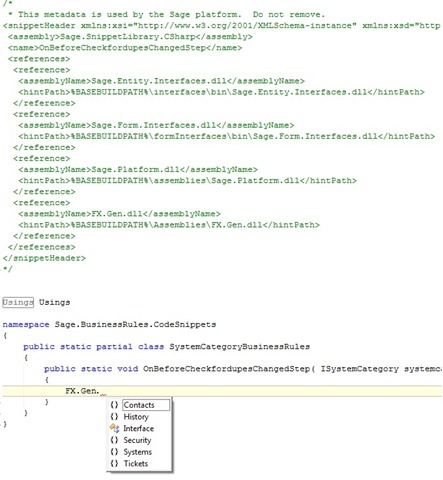
I initially realized my external assemblies all had references to the old 7.5.1 Sage references. I recompiled the assembly using the new 7.5.2 Sage dlls as references within it. This did not help but is an important thing to remember you have to do.
I also tried adding a reference in the codesnippet.xml file (On Win7 this is @ C:ProgramDataSagePlatformConfigurationGlobal) which I understand is supposed to act like a global assembly reference for all files on the site. This didn’t work either.
I was at my wits end. By chance I happened to see a warning message that had occurred way up in my build. That led me to the solution I needed.
As I mentioned, I think this should be considered a bug. It is really stupid but easy to remedy.
I think that before 7.5.2 when you had external assemblies referenced in code snippets, or whatnot, that when you built, it used the specified reference path to do the build (logical). Apparently in 7.5.2, while you still need to add the reference to the assemblies in the code files, it apparently does not use that path during the build, or at least all parts of the build.
The simple fix is: any external assemblies need to exist in the SalesLogixSalesLogix directory (C:Program FilesSalesLogixSalesLogix"), regardless of where each code file says the reference location is. I figured this out because I had a warning message earlier on that said:
Unable to locate assembly reference FX.Gen.dll in assemblies or C:Program FilesSalesLogix.
Now, I don’t know why this message says this because my assembly is in my output folder’s "assemblies" directory (that is where I specified it was in my code file references). Regardless, simply copy the file to the directory makes it all sing.
This whole assembly reference area seems REALLY kludge to me. It gets exponentially harder to manage when you are talking about multiple assemblies being added by multiple developers on different computers with different OS and centrally shared using Git. I hope Sage does something to help with this because I can see that this will be a nightmare for system maintenance and upgrades.


Kris,
I can’t thank you enough for this post!!!
Its early AM… and I’ve wasted HOURS trying to figure this one out.
Ron Buchanan
Brainsell – VA