back to top

SalesLogix 7.5 Beta Testing Has Begun!

The beta tesing for SalesLogix 7.5 has begun! Completely exciting. This is THE release for SalesLogix web, and one that IMO puts SalesLogix in the front of all other web-based CRM applications.  If you’re using SalesLogix Web and not yet planning on moving to 7.5 it’s time to start planning that SalesLogix upgrade.

There will be plenty of things coming to show all the new features of 7.5 (like the upcoming Customer FX 7.5 Sneak Peek live workshop) , but I wanted to point out a few small and less talked about things that I’ve liked so far in this release.

New Look & Feel

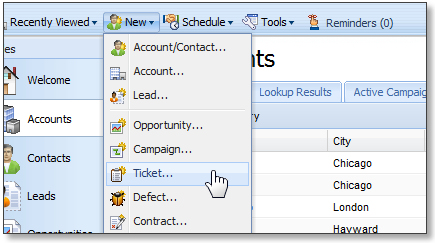
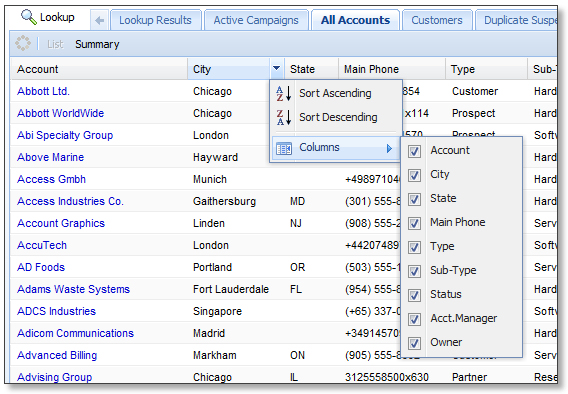
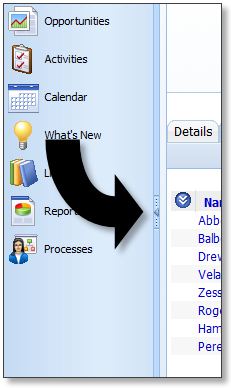
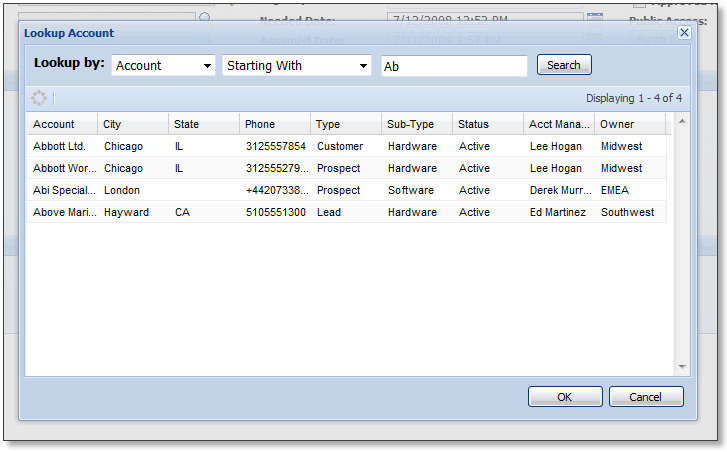
The new “polished” look of the web client is completely impressive. I stuggled with the look of the original 7.2 client, had a hard time liking how it looked. Not the case any more. This looks awesome. Here’s a few examples:

The new menus:
The new group viewer:
 Collapsible navbar:
Awesome looking dialogs, especially lookups – wow those were really needed and I just can’t get over how great they look!
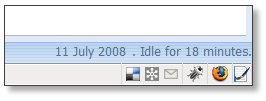
Session Timeout Indicator

In the bottom-right corner. And you get bumped out to the login screen as soon as it expires. Small change, yes, but a nice one to have. Also, you get a count down to when you are going to get automatically logged off too – “auto logoff in 1 minute”:
Performance

One completely great addition in 7.5 is that you no longer have such a long wait time when clicking between tabs. In previous versions, each time you clicked a tab you’d get the progress bar while it was retrieved and loaded. You still have the for the first time you click it, but then it stays loaded so you can go to other tabs and then back to it and it displays immediately.  The result is a huge and noticeable performance increase in just moving around the client. Cool!

Deployment

I don’t know if this was an intended “feature” or not, but I love it. The deployment status window is no longer modal to the Application Architect. You can deploy and then click around in the AA while the deployment is happening. No more frustrating waits just to look at some things while it is deploying. 

Forms

There’s a new addition of non-entity related forms! There will be plenty more to come on this one.

Anyway, off the top of my head, those are some of the smaller things that hit me as I moved around and played with the first SalesLogix 7.5 beta. Plenty more will follow.

Contact Customer FX for your CRM project
We let our expertise speak for itself - let us know how our all-star team can help on your CRM project
About the Author
Ryan Farley
Ryan Farleyhttps://customerfx.com/article/author/ryanfarley/
Ryan Farley is the Director of Development for Customer FX and creator of slxdeveloper.com. He's been blogging regularly about SalesLogix, now Infor CRM, since 2001 and believes in sharing with the community. His new passion for CRM is Creatio, formerly bpm'online. He loves C#, Javascript, web development, open source, and Linux. He also loves his hobby as an amateur filmmaker.

1 COMMENT

  1. Francois,

    The current 7.5 beta does have an implementation guide (with normal beta kinks in some of the setup steps as expected for a beta). I do agree. The beta 7.5 is far more stable than the current 7.2.2 release.

    -Ryan

LEAVE A REPLY

Please enter your comment!
Please enter your name here

Infor CRM Sync for Exchange: Action Required by August 31, 2026

Using Infor CRM Sync for Exchange with Microsoft 365? Your Exchange administrator must update tenant settings by August 31, 2026 to prevent sync disruption.

[Webinar] What’s Coming Next for Infor CRM SLX and Why v10 Matters

See what’s coming next for Infor CRM SLX, including new marketing workflows, automation improvements, and reasons to consider upgrading to v10.

Disable Caching in Infor CRM SLX Web Client

In the rare case caching is causing issues in the Infor CRM SLX web client, it is possible to disable specific types of caching by making edits using Application Architect, and then deploying.

Exploring AI Options for Infor CRM v10

I've started taking a closer look at the AI capabilities built into Infor CRM v10. Over the next several posts, I'll share what I learn. From the built-in features and supported AI providers to implementation considerations, costs, and practical use cases.

Infor CRM SLX 10.0: Delegate Ownership Changes for “Everyone” Records

Learn how the new EveryoneOwnerAssignment secured action in Infor CRM SLX 10.0 allows designated users to change ownership of Everyone-owned records without requiring Administrator access.

Related Articles

Infor CRM Sync for Exchange: Action Required by August 31, 2026

Using Infor CRM Sync for Exchange with Microsoft 365? Your Exchange administrator must update tenant settings by August 31, 2026 to prevent sync disruption.

[Webinar] What’s Coming Next for Infor CRM SLX and Why v10 Matters

See what’s coming next for Infor CRM SLX, including new marketing workflows, automation improvements, and reasons to consider upgrading to v10.

Disable Caching in Infor CRM SLX Web Client

In the rare case caching is causing issues in the Infor CRM SLX web client, it is possible to disable specific types of caching by making edits using Application Architect, and then deploying.

Exploring AI Options for Infor CRM v10

I've started taking a closer look at the AI capabilities built into Infor CRM v10. Over the next several posts, I'll share what I learn. From the built-in features and supported AI providers to implementation considerations, costs, and practical use cases.

Related Videos