Today we are looking at two analysis reports that reference the Area, Category, and Issue fields of the Tickets level. Both of these Crystal reports come with a standard implementation of Sage SalesLogix. The Area, Category, and Issue values are managed under the Tools/ Manage/Customer Service Options – on the Area/Category/Issue tab.

I really like this first report called the Support Problem Analysis. The report uses the condition fields of Assigned User and Assigned Date. When running the report you are prompted with a date range parameter. The report then counts and totals the number of Tickets by Area, Category, and Issue within the date range entered.
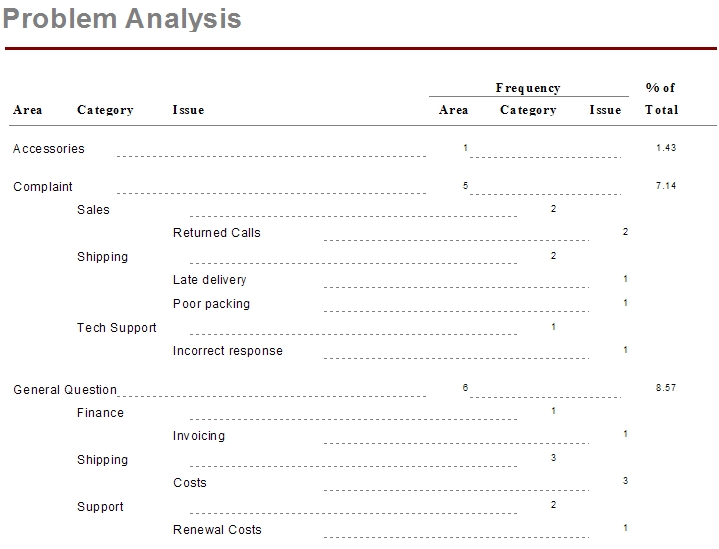
My suggestions for improvements to this report are limited to the dotted lines. Although they get you pointed in the right direction so you can find the count, I believe we could format the sections of this report using shading and/or labeling to make the report look more professional. But again, I really like this report, it is simple and concise, and gets the point across effectively. This report was updated, follow this link to see how.
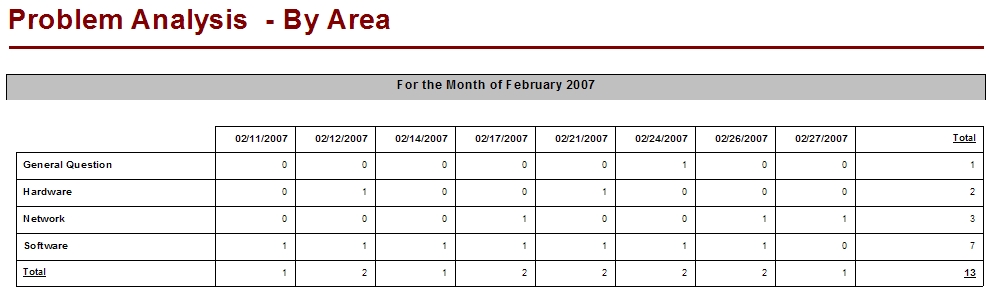
The Problem Analysis – By Area report provides a, by Month, by Day, count of each Ticket area chosen during your selected date parameter. The report uses the condition fields of Modify Date and Modify User. The layout of this report causes issues especially with companies with high support activity. If you a running a 7X24 hour support this report would be valuable but messy to read
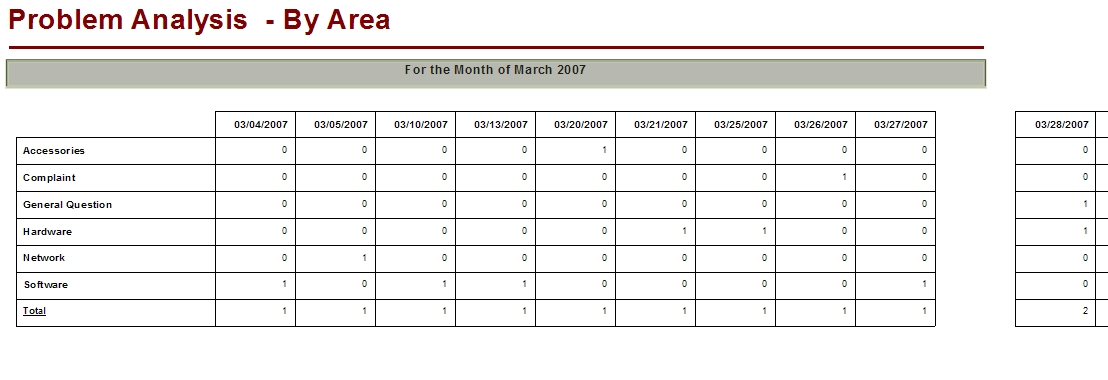
You can see in our shrunken example how the report runs off of the current page and unto another. When printing the report it is the next page on the document but the additional page has no header and no page number. This issue is easy enough to deal since it is a Cross Tab data grid. The month and the year are already displaying in the Group Header so by customizing the format of the date field and playing with the grid field widths, I was able to get rid of all of the white space and moved all of the data onto one page for each month and allowed the report to display more then one month per page. Here is the same report just cleaned up a bit.

Now, I take up a little more then half of the paper, I see all columns and I have more then one month on a page. I actually cut out the third month that was displaying. With a little more work we could work, this report could display all of the days of the month support was provided.
I better get back to the work. If you want the free and cleaned up version of the report (as seen above) follow this link.
Only 8 more SalesLogix Reports to cover to complete this series of posts. Then my plan is to revisit each post and talk you through making some of our recommended changes come to life.