back to top

SalesLogix Ticket Reports (Part 5)

Continuing on with the review of the Ticket area reports.  Today we will focus on the reports labeled “Support Ticket” and “Support Ticket Knowledge Base Summary”.  Both of these Crystal reports come with a standard implementation of Sage SalesLogix and both use the condition field of Modify Date and Modify User.


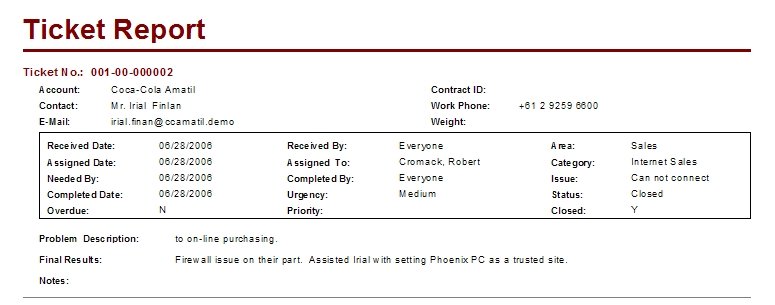
The Support Ticket Report provides all of the top level Ticket information.  The report is written very well, I could not find anything wrong from the development side of things.  Some things you could do would be to include Ticket History and Ticket Activity Summaries but this report is operating very well as is.


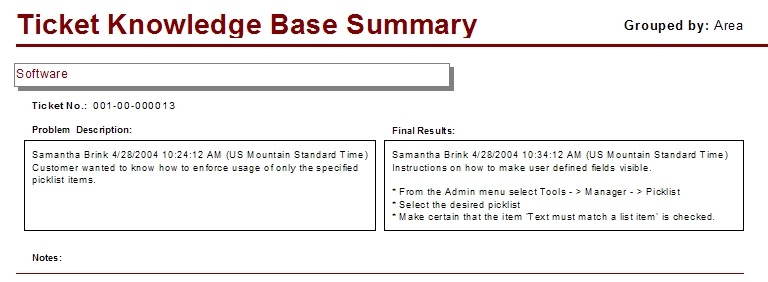
Our next report is one that should be categorized with the reports listed in the last post, SalesLogix Ticket Reports (Part 4).  The Support Ticket Knowledge Base Summary report allows the user to see all of the Tickets that have been submitted to the SalesLogix Speed Search organized by Area, Category, or Issue.  If you like the layout of this report is would be easy to convert it to cover all tickets by removing the report selection formula.  Again, a very nice clean report.  This report was updated, follow this link to see how.


Since we have some time lets cover one more Crystal Report.  This report is labeled the “Support Ticket Status By Assigned”.  The report uses the condition fields of Assigned To and Assigned Date.  This report is organized by User, then by Ticket. There is a roll up of statistics concerning the users Ticket Management at the end of their group.  There is only one issue that I can see with the report layout.  The Notes field is bringing in the Internal Comments from the Ticket.  The field is set to grow as it should be with any memo field, but the line underneath is located in the same section. When the field grows it runs over the line making it appear as if there are two records.  The fix is adding another section and inserting only the line which will then display after the Notes section is done growing.  This report was updated, follow this link to see how.


I better get back to the grind.  Thanks for reading.  Stay well and do good things. Geo


Contact Customer FX for your CRM project
We let our expertise speak for itself - let us know how our all-star team can help on your CRM project
About the Author

LEAVE A REPLY

Please enter your comment!
Please enter your name here

Infor CRM Sync for Exchange: Action Required by August 31, 2026

Using Infor CRM Sync for Exchange with Microsoft 365? Your Exchange administrator must update tenant settings by August 31, 2026 to prevent sync disruption.

[Webinar] What’s Coming Next for Infor CRM SLX and Why v10 Matters

See what’s coming next for Infor CRM SLX, including new marketing workflows, automation improvements, and reasons to consider upgrading to v10.

Disable Caching in Infor CRM SLX Web Client

In the rare case caching is causing issues in the Infor CRM SLX web client, it is possible to disable specific types of caching by making edits using Application Architect, and then deploying.

Exploring AI Options for Infor CRM v10

I've started taking a closer look at the AI capabilities built into Infor CRM v10. Over the next several posts, I'll share what I learn. From the built-in features and supported AI providers to implementation considerations, costs, and practical use cases.

Infor CRM SLX 10.0: Delegate Ownership Changes for “Everyone” Records

Learn how the new EveryoneOwnerAssignment secured action in Infor CRM SLX 10.0 allows designated users to change ownership of Everyone-owned records without requiring Administrator access.

Related Articles

Infor CRM Sync for Exchange: Action Required by August 31, 2026

Using Infor CRM Sync for Exchange with Microsoft 365? Your Exchange administrator must update tenant settings by August 31, 2026 to prevent sync disruption.

[Webinar] What’s Coming Next for Infor CRM SLX and Why v10 Matters

See what’s coming next for Infor CRM SLX, including new marketing workflows, automation improvements, and reasons to consider upgrading to v10.

Disable Caching in Infor CRM SLX Web Client

In the rare case caching is causing issues in the Infor CRM SLX web client, it is possible to disable specific types of caching by making edits using Application Architect, and then deploying.

Exploring AI Options for Infor CRM v10

I've started taking a closer look at the AI capabilities built into Infor CRM v10. Over the next several posts, I'll share what I learn. From the built-in features and supported AI providers to implementation considerations, costs, and practical use cases.

Related Videos