


I had the pleasure of actually talking to some of the readers of this blog over the last week. It was a lot of fun talking to people with the same interest as I have. I find working in the Crystal Reports very challenging and it was nice to know that others find the challenge interesting (and Frustrating) also. Most of all it was nice to hear the work I am doing here is received well.
One thing that was said in just about every phone call was the fact that a user spent hours or, in one case, an entire day trying to figure something the best way of doing something. I will be honest and tell you that in one of the phone calls the reader was a very talented Crystal Developer and I was honored to hear that he follows this blog. (Sorry Robin, I know I was not much help. ) But in both the other calls I was able achieve the required results in 15 minutes. I know you learn a lot about Crystal trying and then failing but your time is valuable and this is what I do – so please feel free to e-mail me anytime at george.jensen@customerfx.com.
One follower mentioned that she would like to see a SalesLogix Crystal Reports Class. Is there any other interest? Please let me know.
Well last week we finished the History family of SalesLogix Crystal Reports. We are going to jump over the Labels and move right on to the Opportunity level for which I wrote a blog post on January 6th of this year. Here is the link if you want to revisit. This is what I wrote on the “Competitor by Opportunity Status” report.
Start Excerpt ……………………….
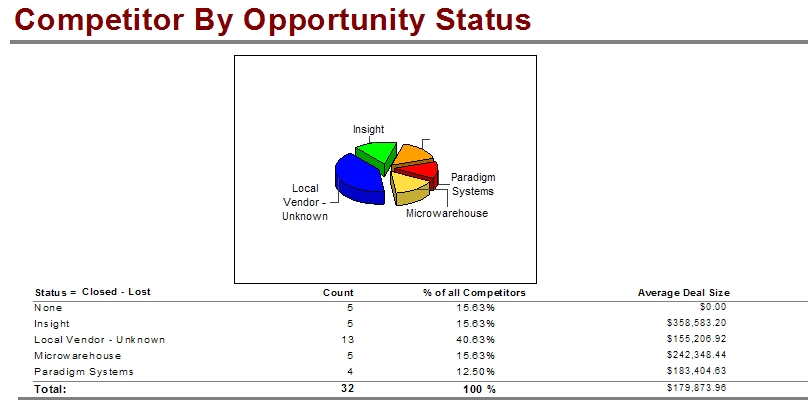
The first is the Competitor By Opportunity Status report. This report uses the condition filter fields of AccountManagerID and Estimated Close. When you run the report you are presented with two parameters. The first asks what Opportunity Status do want to report against, this includes a values of All. Warning, these parameter values are typed in so if you have custom values for Opportunity Status then you will have to update the report. The second parameter is whether you want the graph to display or not. Some of the information provided could be confusing, the column on the left is the Competitor Name and Count is how many deals they are involved in.
End Excerpt ……………………….
So not a lot to do today. I went into this report and gave it a fresher look by moving the Opportunity Status to the top of the group and then added the Competitor Tab. I then played around with the pie chart and made it larger and set the properties to allow you to be able to read the Competitor Names.
Here is the updated Report.

Again feel free to write and thanks for reading this post
Make sure to download a free copy of this report using this link.
Get all of our Free SalesLogix Reports here…

