


The SalesLogix Sales Processes allow users to create a set of repeatable stages and steps to help automate the selling process. While these processes are a boon to the sales person they can be a pain to have to work with as a developer since their details are not readily exposed.

As the above screen shot shows, managing the Sales Process is easy to do from the Tools…Manage…Sales Process area of the SalesLogix client. However, the details of what comprise a Sales Process is actually stored in the Plugin table. Sales Processes are plugins with a PLUGIN.TYPE = 1. If you query a row in something like SQL Query Analyzer using something like:
Select * from plugin where type = 1
You will see the contents of the Sales Process are contained in the Data column and are serialized to be unreadable.

The same query done through the SalesLogix Administrator’s Execute SQL function actually shows the data is a serialized XML data set:
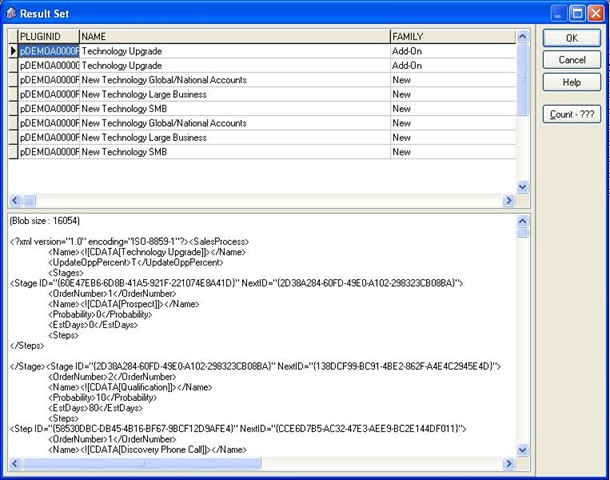
Since we have the XML data we should be able to work with it. Luckily SalesLogix has implemented a function for extracting plugin data from its serialized format to plain text. Using the GetPluginText function implemented in the application.basicfunctions class allows us to do this. The function requires passing in the plugin’s family and name seperated by a colon, like shown here:
strxml = application.BasicFunctions.GetPluginText(strFamily & ":" & strPluginName)
Now that we have the data extracted we can use standard XML calls to read the Sales Process data. Let’s take a look at how you could read all of the stages that exist in a Sales Process. With the XML extracted to plain text using GetPluginText we can do something like this:
xml = application.BasicFunctions.GetPluginText(strFamily & ":" & strPluginName)
Set objXMLDoc = CreateObject("Msxml2.DOMDocument")’DNL
objXMLDoc.async = false
If objXMLDoc.loadXML(XML)= False Then
msgbox Application.Translator.Localize("Invaild Sales Process XML in plugin: ") & mPluginName
Exit Sub
End If
Set objContentSetsNodes = objXMLDoc.documentElement.selectNodes("//SalesProcess") ‘DNL
Set objNodes = objContentSetsNodes.Item(0).selectNodes("//Stages").Item(0).SelectNodes("Stage") ‘DNL
‘Resize the dynamic array
Redim mArrColorTheme(objNodes.length)
For i = 0 to objNodes.length – 1
strStage= objNodes.Item(i).selectNodes("//Stage").Item(i).selectSingleNode("Name").Text
msgbox strstage
Next
This code goes into the top <SalesProcess> node, looks for the <Stages> node and then, within it, loops through all of the <Stage> nodes and returns all of the <Name> attributes back with a message box.
Not too bas, but a little bit harder than if the process definitions were stored somewhere other than the plugin table.

