back to top

Web Core Update 03 Now Available for v8

This is an important update that includes several new features as well as addressing multiple defects.  Highlights of this release include:


New features:.


–Lays the groundwork for Google Integration.


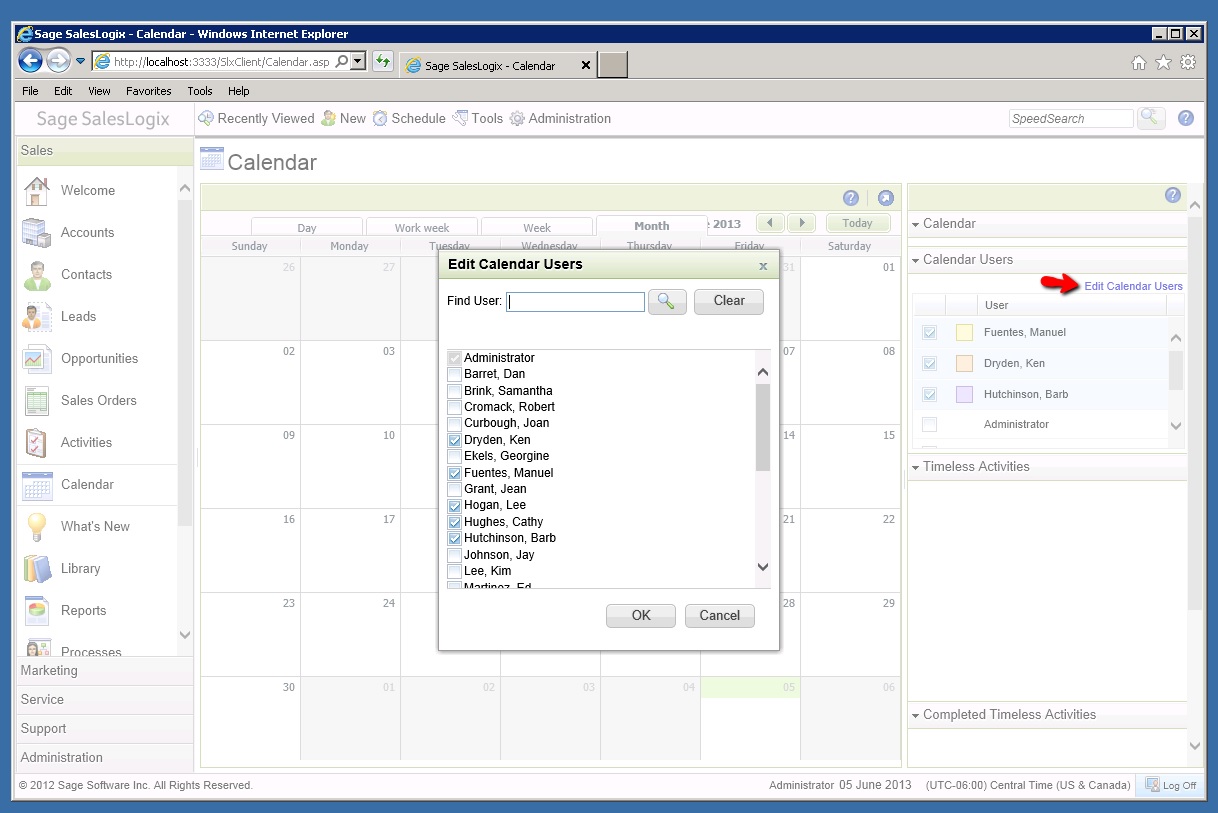
–Added personalization for Calendar display – the User can now select  25 Users as their “favorites” to display in the “Calendar Users” View.


–Added ability to modify the storage location of the Job Store database.


–Extension model for attachment to SData endpoint, which allows for customization


Notable Defects Addressed:.


–Fixes security access error issue encountered when attempting to merge two accounts owned by Everyone.


–Fixes defect that occurs when updating the Contact Account Manager in the Update Contact Options dialog window.


–Addresses a long running script error message when navigating a list or detail view on database with a large number of Groups.


–Fixes an error that occurs when trying to access web reports in some upgraded environments.


Update is cumulative of Web Core Update 01 and 02.


For more information, please see the attached “What’s New” document or refer to “Installing Web Core Update 03 for Sage SalesLogix.”

Contact Customer FX for your CRM project
We let our expertise speak for itself - let us know how our all-star team can help on your CRM project
About the Author
Scott Weber
Scott Weber
Scott Weber is CRM Practice Manager and Senior Consultant for Customer FX Corporation.

LEAVE A REPLY

Please enter your comment!
Please enter your name here

Infor CRM Sync for Exchange: Action Required by August 31, 2026

Using Infor CRM Sync for Exchange with Microsoft 365? Your Exchange administrator must update tenant settings by August 31, 2026 to prevent sync disruption.

[Webinar] What’s Coming Next for Infor CRM SLX and Why v10 Matters

See what’s coming next for Infor CRM SLX, including new marketing workflows, automation improvements, and reasons to consider upgrading to v10.

Disable Caching in Infor CRM SLX Web Client

In the rare case caching is causing issues in the Infor CRM SLX web client, it is possible to disable specific types of caching by making edits using Application Architect, and then deploying.

Exploring AI Options for Infor CRM v10

I've started taking a closer look at the AI capabilities built into Infor CRM v10. Over the next several posts, I'll share what I learn. From the built-in features and supported AI providers to implementation considerations, costs, and practical use cases.

Infor CRM SLX 10.0: Delegate Ownership Changes for “Everyone” Records

Learn how the new EveryoneOwnerAssignment secured action in Infor CRM SLX 10.0 allows designated users to change ownership of Everyone-owned records without requiring Administrator access.

Related Articles

Infor CRM Sync for Exchange: Action Required by August 31, 2026

Using Infor CRM Sync for Exchange with Microsoft 365? Your Exchange administrator must update tenant settings by August 31, 2026 to prevent sync disruption.

[Webinar] What’s Coming Next for Infor CRM SLX and Why v10 Matters

See what’s coming next for Infor CRM SLX, including new marketing workflows, automation improvements, and reasons to consider upgrading to v10.

Disable Caching in Infor CRM SLX Web Client

In the rare case caching is causing issues in the Infor CRM SLX web client, it is possible to disable specific types of caching by making edits using Application Architect, and then deploying.

Exploring AI Options for Infor CRM v10

I've started taking a closer look at the AI capabilities built into Infor CRM v10. Over the next several posts, I'll share what I learn. From the built-in features and supported AI providers to implementation considerations, costs, and practical use cases.

Related Videos