back to top

Wiring up a SalesLogix Entity Event to an External Assembly

The SalesLogix entity model allows you to add an event/business rule action to a public method in an external assembly.  This post talks about how to do this.  I will not be talking about actually building an external assembly but just how to wire them up.

To do this:

Log into the Application Architect as Admin.

Go to the menu View…Project Explorer.  This will open the Project Explorer navigator in your current workspace.  Expand out the Entity Model…SalesLogix Application Entities… Select your entity.  For my example I will choose SalesOrderItem.

Project Explorer

Once you expand out your entity you will see Rules, and under this are the Business Rule and Event hooks.  In my sample I will be adding an OnBeforeDelete Post Execute Event.

SalesLogix already wires up some events to have Primary Steps.  You can only have one active Primary step.  Usually it is not advisable to replace the SalesLogix pre-wired event as it handles important business logic (usually).  Typically you always want to add either Pre Execute Steps or Post Execute Steps.  In my case I am adding a post execute step, which will run after the built in SalesLogix Primary Step. BTW, on a side note these pre-wired steps SalesLogix has reference external assemblies, just like what we are going to do.

 Back to the Sample, I double click on the OnBeforeEvent and the Event opens in the Application Architect.
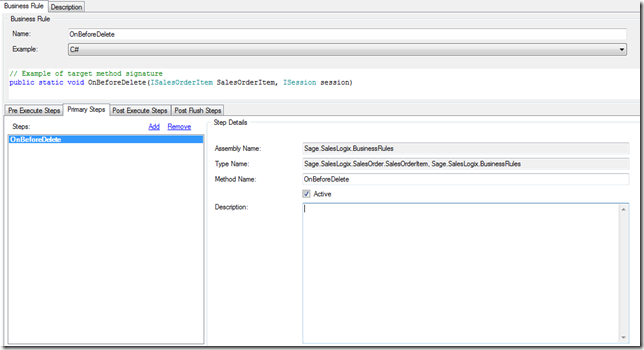
 OnBeforeDelete-Primary Steps

 I want to add a Post Execute Step, so I will click on that tab.
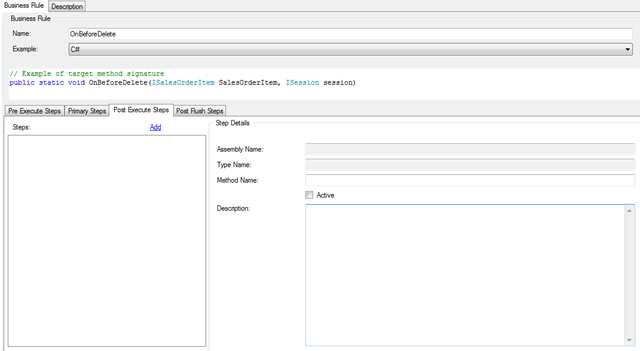
OnBeforeDelete-Post Execute1

 I can see there are no Steps defined yet.  If there were I could add an additional step.  Pre and Post events can have multiple Steps.  Only the Primary Step can have one active step defined. 

Click Add to add a new Step.
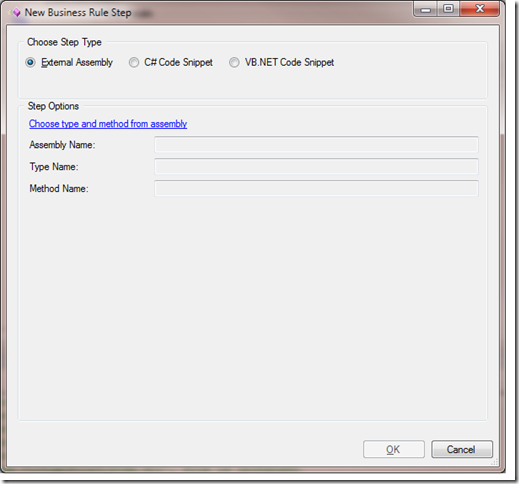
 New Business Rule Step

 In the New Business Rule Step dialog that opens,

Choose the option for External Assembly.  Notice that the bottom part of the screen changes and all of the edit boxes are read only.  This is OK.  The interface doesn’t want you to type in freely and make a mistake.  Instead, click the hyperlink “Choose type and method from assembly”.
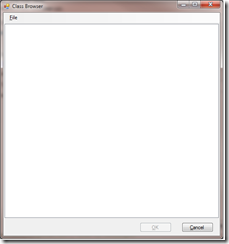
 Class Browser

The class browser window appears. 

The only choice here is to choose the menu File..Open. This will open a Browser window where you can browse out to your External Assembly file.  When you do so, Click Open on the browser window.
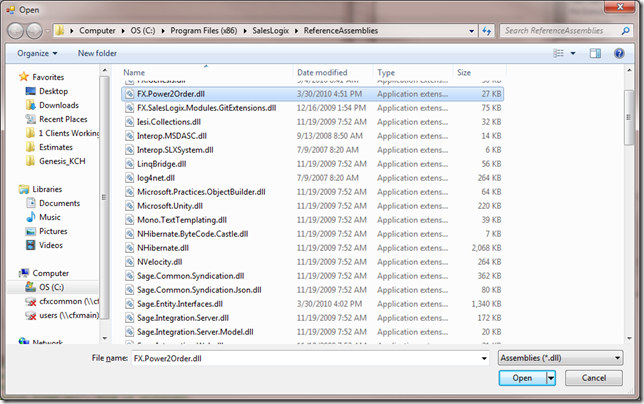
 Class Browser -Broswer Window


Now that you have selected your Assembly, the Class Browser dialog should show you all of the Namespaces, Classes and Methods in the assembly.  Navigate the assembly and choose the method you want to use.
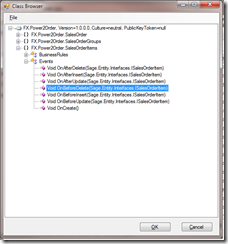
 Class Browser Filled


Select OK.

OnBeforeDelete-Post Execute2

The Event has now been wired up.

Contact Customer FX for your CRM project
We let our expertise speak for itself - let us know how our all-star team can help on your CRM project
About the Author
Kris Halsrud
Kris Halsrud
Kris Halsrud is a Senior Analyst / Developer for Customer FX Corporation.

LEAVE A REPLY

Please enter your comment!
Please enter your name here

Infor CRM Sync for Exchange: Action Required by August 31, 2026

Using Infor CRM Sync for Exchange with Microsoft 365? Your Exchange administrator must update tenant settings by August 31, 2026 to prevent sync disruption.

[Webinar] What’s Coming Next for Infor CRM SLX and Why v10 Matters

See what’s coming next for Infor CRM SLX, including new marketing workflows, automation improvements, and reasons to consider upgrading to v10.

Disable Caching in Infor CRM SLX Web Client

In the rare case caching is causing issues in the Infor CRM SLX web client, it is possible to disable specific types of caching by making edits using Application Architect, and then deploying.

Exploring AI Options for Infor CRM v10

I've started taking a closer look at the AI capabilities built into Infor CRM v10. Over the next several posts, I'll share what I learn. From the built-in features and supported AI providers to implementation considerations, costs, and practical use cases.

Infor CRM SLX 10.0: Delegate Ownership Changes for “Everyone” Records

Learn how the new EveryoneOwnerAssignment secured action in Infor CRM SLX 10.0 allows designated users to change ownership of Everyone-owned records without requiring Administrator access.

Related Articles

Infor CRM Sync for Exchange: Action Required by August 31, 2026

Using Infor CRM Sync for Exchange with Microsoft 365? Your Exchange administrator must update tenant settings by August 31, 2026 to prevent sync disruption.

[Webinar] What’s Coming Next for Infor CRM SLX and Why v10 Matters

See what’s coming next for Infor CRM SLX, including new marketing workflows, automation improvements, and reasons to consider upgrading to v10.

Disable Caching in Infor CRM SLX Web Client

In the rare case caching is causing issues in the Infor CRM SLX web client, it is possible to disable specific types of caching by making edits using Application Architect, and then deploying.

Exploring AI Options for Infor CRM v10

I've started taking a closer look at the AI capabilities built into Infor CRM v10. Over the next several posts, I'll share what I learn. From the built-in features and supported AI providers to implementation considerations, costs, and practical use cases.

Related Videos