


This blog post is the first of many that will cover the topics of using source control with SalesLogix development, Customer FX’s open source initiative, and the new Git Extensions for SalesLogix module for Application Architect. These are three things I am completely excited about. Using source control with SalesLogix development in Application Architect is a necessity if you want to do it right. Git Extensions for SalesLogix is the first of the Customer FX open source initiative that builds on the idea of using source control with SalesLogix development to make it even easier to use Git source control right from inside Application Architect as a natural, built-in part of the application.
The Customer FX Open Source Initiative
Before we get to the details about Git Extensions for SalesLogix, I want to mention a few things about the Customer FX Open Source Initiative. For years, Customer FX has been a consistent source of information in the SalesLogix community. We make it a point to post anything interesting or useful to our blogs. It is great to work for a company that puts so much emphasis on sharing with the community. After all, when the community thrives, we all benefit. The management team at Customer FX actually factors in blogging time into everyone’s schedule to make it easy for us to share what we know.
We are going to start taking that a step further. Not only will we be sharing knowledge, but we’ll be sharing code now too. There will be much more to come on this topic, so stay tuned and you’ll start to see more and more open source projects coming from Customer FX. We hope to pick up some collaborators from the community as well. The first of our open source projects is the Git Extensions for SalesLogix module. Read on.
Using Source Control with SalesLogix Development
I’m not going to spend too much time talking about this topic since it deserves much more individualized attention. But, if you work in Application Architect customizing SalesLogix and you’re not using source control. I hear your pain. Using source control for your SalesLogix models is the only way to do it right. My personal favorite is Git, so much of my information will be covering Git source control, however, I do plan on touching on Subversion from time to time as well.
Git Extensions for SalesLogix

So, without further ado, let’s take a quick look at my new Git Extensions for SalesLogix module. Git Extensions for SalesLogix is a module for Application Architect that extends AA to include the most common Git functions, right on the AA toolbar and menus. Imagine this, you open a form in AA, make some changes, then click a button on the toolbar in AA to commit the change. Later, you click another button on the AA toolbar to push back to your online repository. All without ever leaving Application Architect. This is what Git Extensions for SalesLogix gives you. Well that, and a break from some headaches. Git Extensions for SalesLogix integrates the completely awesome open source Git Extensions into Application Architect. So to use Git Extensions for SalesLogix, you’ll also need to have Git Extensions installed.
Here’s a screenshot of Application Architect with Git Extensions for SalesLogix loaded:
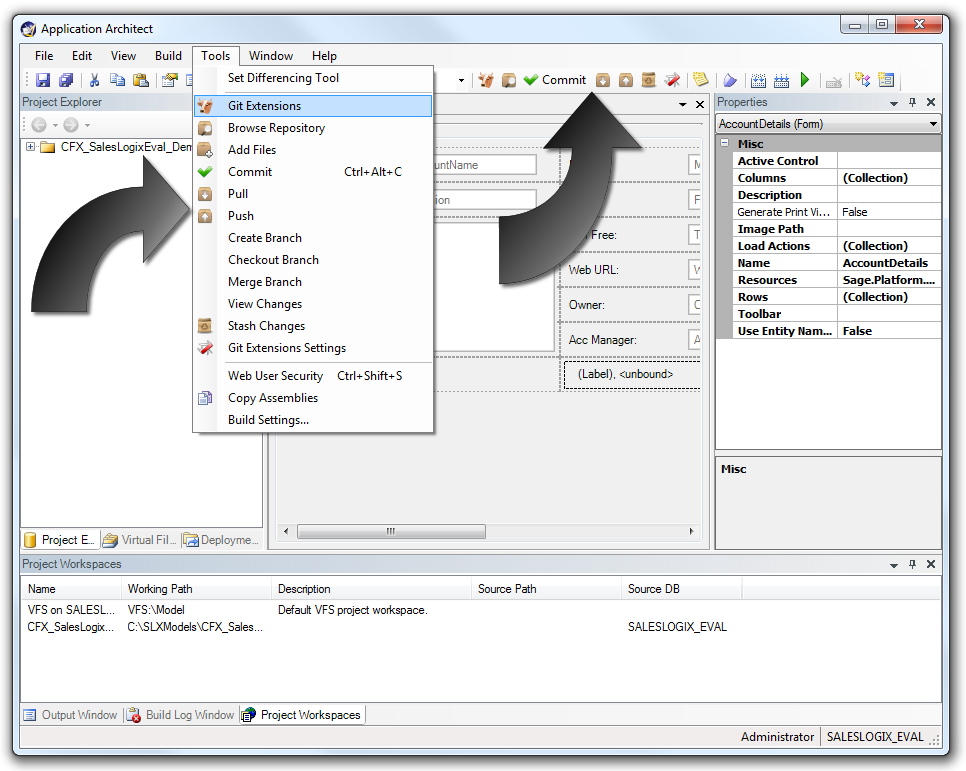
(Click for a larger view)
Git Extensions for SalesLogix is fully functional and will likely grow to include many more functions in the future. You can grab this now and use it. You can also grab the code and submit patches for any changes you’d like to make. If you would like to collaborate submit a patch and I’ll add you as a collaborator (or just ask). Take a look below for details on the repository location, or to just install it.
 |
Visit the Git Extensions for SalesLogix Repository |
To install Git Extensions for SalesLogix visit the Installation page in the project Wiki on Github.
Keep in mind, the initial version of this module was cranked out all in one night, so you’re bound to find some bugs. I’ve only tested it so far in 7.5.2 and 7.5.1 (versions prior to 7.5.2 will have some funky placement of separators on the toolbar and menus). Also, the next version will no longer need to modify the XML file listed above (steps 4-6) and you’ll just be able to drop the DLL into the modules folder in the SalesLogix directory.
Enjoy, and I hope to get some feedback from others who wish to use the module. Also, for anyone who would like to use source control but just don’t know how, I am considering offering a training class on using source control with SalesLogix and working in a multi-developer environment. Let me know if you’d be interested.
Update: Don’t miss my next post where I show a video preview of Git Extensions for SalesLogix in action. View it now.


Ryan, these are fantastic – thank you so much for putting the time to develop them.