back to top

Attempting to add the Processes tab to the Contact middle pane in the SalesLogix LAN client breaks visibility to Contacts

I recently had a client call saying that one particular user could no longer access contacts from any method in the SalesLogix LAN client.  Before the contact screen would open the user gets an error similar to:
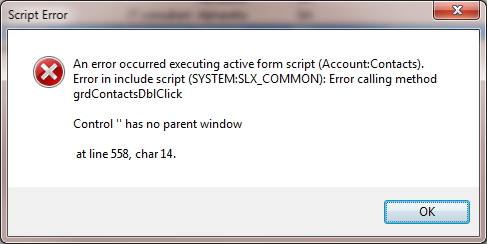
 

While the exact error differed based on where you were trying to navigate from, generally you always so a similar “Control ” has no parent window”  message.


It turns out what happened was the user had tried to drag the Contact tab “Processes” into the middle portion of the LAN client. Doing this sets a record in the USEROPTIONS table.  This record defined what plugin should be loaded in the middle pane the next time the screen opens.  By setting these attributes is how SalesLogix remembers what the screens should look like for a user.  The problem is that the Processes tab is not a plugin.  The Processes tab is part of the core SalesLogix executable.  Apparently once you set that middle view property you are then no longer able to open the Contact view at all because the system is trying to find a plugin called “Contact:Processes”.  Since it is not a plugin, it fails and you get the “Control ” has no parent window”  message.

To fix this you can run the following SQL statement against your SalesLogix database.

update useroptions set optionvalue=null where name =’System|Contact Details’ and category=’MiddleView’ and cast(optionvalue as varchar(8000)) like ‘contact:processes%’

If you are not familiar with running a SQL statement, here is a step by step. 

Boilerplate warning message:

Running SQL statements against your database when you don’t know what your doing can seriously hose things up.  Only do this type of thing when instructed or when you know for sure what you are doing!

  1. Log into the SalesLogix Administrator as the Admin user.
  2. Go to the Tools…Execute SQL drop down menu.
  3. Within the Execute SQL dialog, In the top window, right click and choose Add.
  4. Copy the following SQL statement into the Edit SQL window: update useroptions set optionvalue=null where name
    =’System|Contact Details’ and category=’MiddleView’ and
    cast(optionvalue as varchar(8000)) like ‘contact:processes%’ 
  5. You can press the Test button to see how many rows will be updated.   (Answer Yes to the Confirmation that is presented).
  6. Press OK on the Edit SQL dialog.
  7. Click the Execute statements on the Host Database check box.
  8. If you have remote users, move them all into the Selected Remotes list.
  9. Click the Execute button.
  10. Answer Yes to the Confirmation that is presented.
  11. Once the statement has run, press OK on the Execute SQL window that has appeared.
  12. Click Close on the Execute SQL dialog.

I have confirmed this to be an issue on all SLX level up through 8.0.


Contact Customer FX for your CRM project
We let our expertise speak for itself - let us know how our all-star team can help on your CRM project
About the Author
Kris Halsrud
Kris Halsrud
Kris Halsrud is a Senior Analyst / Developer for Customer FX Corporation.

LEAVE A REPLY

Please enter your comment!
Please enter your name here

Infor CRM Sync for Exchange: Action Required by August 31, 2026

Using Infor CRM Sync for Exchange with Microsoft 365? Your Exchange administrator must update tenant settings by August 31, 2026 to prevent sync disruption.

[Webinar] What’s Coming Next for Infor CRM SLX and Why v10 Matters

See what’s coming next for Infor CRM SLX, including new marketing workflows, automation improvements, and reasons to consider upgrading to v10.

Disable Caching in Infor CRM SLX Web Client

In the rare case caching is causing issues in the Infor CRM SLX web client, it is possible to disable specific types of caching by making edits using Application Architect, and then deploying.

Exploring AI Options for Infor CRM v10

I've started taking a closer look at the AI capabilities built into Infor CRM v10. Over the next several posts, I'll share what I learn. From the built-in features and supported AI providers to implementation considerations, costs, and practical use cases.

Infor CRM SLX 10.0: Delegate Ownership Changes for “Everyone” Records

Learn how the new EveryoneOwnerAssignment secured action in Infor CRM SLX 10.0 allows designated users to change ownership of Everyone-owned records without requiring Administrator access.

Related Articles

Infor CRM Sync for Exchange: Action Required by August 31, 2026

Using Infor CRM Sync for Exchange with Microsoft 365? Your Exchange administrator must update tenant settings by August 31, 2026 to prevent sync disruption.

[Webinar] What’s Coming Next for Infor CRM SLX and Why v10 Matters

See what’s coming next for Infor CRM SLX, including new marketing workflows, automation improvements, and reasons to consider upgrading to v10.

Disable Caching in Infor CRM SLX Web Client

In the rare case caching is causing issues in the Infor CRM SLX web client, it is possible to disable specific types of caching by making edits using Application Architect, and then deploying.

Exploring AI Options for Infor CRM v10

I've started taking a closer look at the AI capabilities built into Infor CRM v10. Over the next several posts, I'll share what I learn. From the built-in features and supported AI providers to implementation considerations, costs, and practical use cases.

Related Videos