


I last posted about creating a business rule to return a list of objects. Today, I will take that a step further and bind the List<IAccount> to a DataGrid using the built-in GetByMethod for binding the list.
In my last post I created a business rule that returned a list of child accounts for the current account named GetChildAccounts. Now, we will create a new account level tab to display this data. Let’s start with the following:
-
Create a new form under the account entity (I don’t typically use the wizards)
-
Add a DataSource to the form and set the following properties on it:
-
Entity Type = Account
-
Get By Method = GetChildAccounts
-
Is Collection = True
-
Source = Account
-
Now add a DataGrid and select the DataSource and add your columns as usual.
You’ll end up with the following:
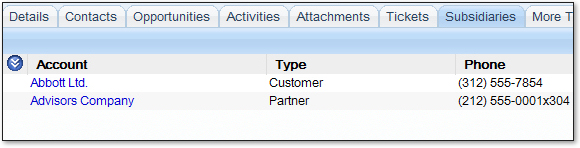
Quite nice and an easy peice of work. I just love the new platform.


Hmmm……so using IList means I can’t have Edit, Delete functionality?
How do you wire up an Edit or Delete button to the grid? Maybe it means having a ‘normal’ button outside of the grid (am not a big fan of the Edit and Delete Columns…..)