


In my last Main Views article, I created the detail view as well as the mainview. For this next part, I’ll go through creating an insert view, as well as toolbar and menu items for the new SLXProject entity.
Creating the Insert View:
The insert view for this new area will be created as a manage view, and the data will be written to the database using ADO. We will start by creating a launch script for this view. After creating a new active script in architect, I added the following code:
Option Explicit
Sub Main
Dim objMv
Application.BasicFunctions.DoInvoke “Form”, “System:Insert SLXProject”
Set objMv = Application.MainViews.Add(“System:Quote Details”, 1, True)
With objMv
.Refresh
.Show
End With
End Sub
The Insert view itself is a simplified version of the detail view we already created. Being a manage view, the controls on the insert view are not mapped to fields in the new SLXProject table.

I’ve also added code to two events on the insert view.
The WhenOpen event is being used to set defualts on the form. In this case, creating the ID for the new record, and defaulting the leader field to the currently logged in user:
Sub AXFormOpen(Sender)
Form.CurrentID = Application.BasicFunctions.GetIDFor(“SLXProject”)
lkeLeader.LookupID = Application.BasicFunctions.CurrentUserID
End Sub
On the WhenClick Event of the OK button on the form, I am creating a new ADO recordset and saving the data entered on the form:
Sub Button1Click(Sender)
Dim objRS
Set objRS = Application.CreateObject(“ADODB.Recordset”)
With objRS
Set .ActiveConnection = Application.GetNewConnection
.CursorLocation = adUseClient
.CursorType = adOpenStatic
.LockType = adLockOptimistic
.Open “select * from slxproject where 1=2”
.AddNew
.Fields(“slxprojectid”).Value = Application.BasicFunctions.GetIDFor(“c_test”)
.Fields(“accountid”).Value = CurrentID
.Fields(“createuser”).Value = Application.BasicFunctions.CurrentUserID
.Fields(“createdate”).Value = Now
.Fields(“modifyuser”).Value = Application.BasicFunctions.CurrentUserID
.Fields(“modifydate”).Value = Now
.Fields(“name”).Value = txtProjectName.Text
.Fields(“description”).Value = memDescription.Text
.Fields(“leader”).Value = lkeLeader.LookupID
.Fields(“isactive”).Value = “T”
.Fields(“accountid”).Value = “”
.Update
.Close
End With
Set objRS = Nothing
Form.ModalResult = mrOK
End Sub
Creating Menu/Toolbars:
I also have created menu and toolbar plugins to view SLXProject data, as well as launching the insert view.
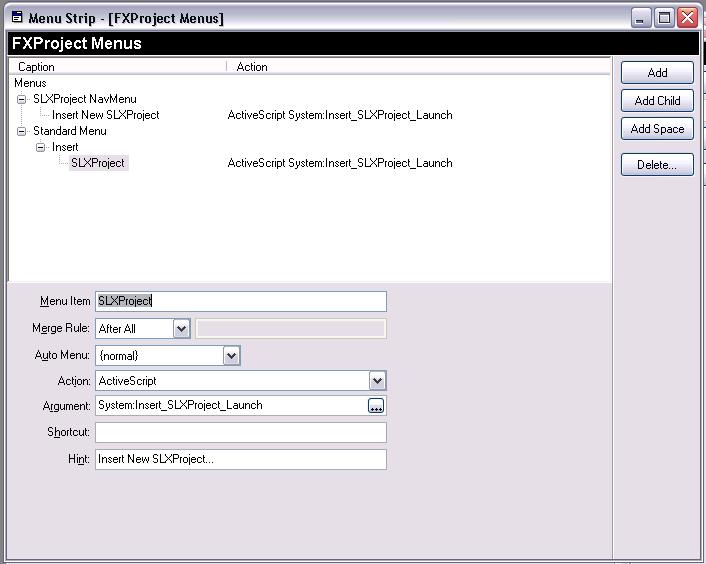
The menu plugin contains two menus. The SLXProject NavMenu is referenced in the toolbar plugin below to allow for right-click functionality to insert a new record from the navbar. Both menus launch the Active script, which in turn loads the insert view.

(Note the popup menu property, referencing the SLXProject NavMenu.)
We’re not quite fully functional yet. In the next article, I’ll go through finalizing the plugins we’ve created so far, and setting up groups and other suplimental views.
Thanks for reading!

