back to top

Corrupted UserOptions entries preventing navigation within the SalesLogix 7.5 LAN client

I recently encountered an issue where a user (in this case Admin) logging into the SalesLogix 7.5 LAN client would have the application crash once the user attempted to navigate to the Accounts area in SalesLogix.  I discovered the reason for this was multiple entries for the user in the USEROPTIONS table.  This table stores various attributes about each user’s options in the SalesLogix client.  Things like how large the middle pain is, what the last active tab is, what the default group is for each main view can be found in this area.  In my case the admin user had multiple entries defining the same attributes.  For instance, looking at the definition of the Middle view tab resulted in 5 duplicate entries:
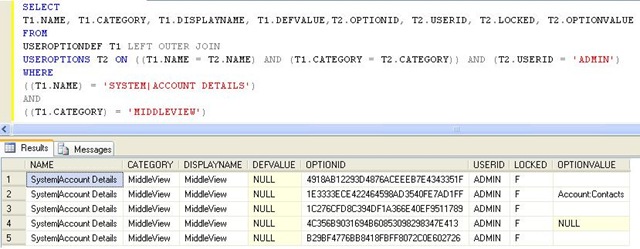
Mutiple entries in USEROPTIONS


I created a query that found the duplicate rows for my specific user and then retained only the last one modified.  I simply updated the USERID field for the other duplicate rows to be an invalid USERID.  Here is that query:

update useroptions set userid=’ADMINXXX’ where optionid in (
select optionid from useroptions a left join
(select category, max(modifydate) as moddate from useroptions where  Name = ‘SYSTEM|ACCOUNT DETAILS’ and userid=’ADMIN’ group by category) as t1
on a.category=t1.category and a.modifydate=t1.moddate
where a.userid=’Admin’ and  a.Name = ‘SYSTEM|ACCOUNT DETAILS’ and t1.category is null)

After running this query I was then able to log back into the client and navigate around normally.  If you use this query be sure to change the necessary criteria to look for the user ID you need and change the update portion to set the value to what you would like.  I was unable to determine how these duplicate rows were added but it appears they were introduced over time, probably by upgrades.  If you encounter a problem like this where the SalesLogix client shuts down when ever you navigate to a given area, try a query of the USEROPTIONS table to see if there are duplicates.  This problem only affects LAN clients as the web client does not use these options.

select userid, category, name, count(userid) from useroptions  group by userid, category, name

Above is a query that will show if there are duplicate entries by user for the various attributes stored in the USEROPTIONS table.

Contact Customer FX for your CRM project
We let our expertise speak for itself - let us know how our all-star team can help on your CRM project
About the Author
Kris Halsrud
Kris Halsrud
Kris Halsrud is a Senior Analyst / Developer for Customer FX Corporation.

1 COMMENT

LEAVE A REPLY

Please enter your comment!
Please enter your name here

Infor CRM Sync for Exchange: Action Required by August 31, 2026

Using Infor CRM Sync for Exchange with Microsoft 365? Your Exchange administrator must update tenant settings by August 31, 2026 to prevent sync disruption.

[Webinar] What’s Coming Next for Infor CRM SLX and Why v10 Matters

See what’s coming next for Infor CRM SLX, including new marketing workflows, automation improvements, and reasons to consider upgrading to v10.

Disable Caching in Infor CRM SLX Web Client

In the rare case caching is causing issues in the Infor CRM SLX web client, it is possible to disable specific types of caching by making edits using Application Architect, and then deploying.

Exploring AI Options for Infor CRM v10

I've started taking a closer look at the AI capabilities built into Infor CRM v10. Over the next several posts, I'll share what I learn. From the built-in features and supported AI providers to implementation considerations, costs, and practical use cases.

Infor CRM SLX 10.0: Delegate Ownership Changes for “Everyone” Records

Learn how the new EveryoneOwnerAssignment secured action in Infor CRM SLX 10.0 allows designated users to change ownership of Everyone-owned records without requiring Administrator access.

Related Articles

Infor CRM Sync for Exchange: Action Required by August 31, 2026

Using Infor CRM Sync for Exchange with Microsoft 365? Your Exchange administrator must update tenant settings by August 31, 2026 to prevent sync disruption.

[Webinar] What’s Coming Next for Infor CRM SLX and Why v10 Matters

See what’s coming next for Infor CRM SLX, including new marketing workflows, automation improvements, and reasons to consider upgrading to v10.

Disable Caching in Infor CRM SLX Web Client

In the rare case caching is causing issues in the Infor CRM SLX web client, it is possible to disable specific types of caching by making edits using Application Architect, and then deploying.

Exploring AI Options for Infor CRM v10

I've started taking a closer look at the AI capabilities built into Infor CRM v10. Over the next several posts, I'll share what I learn. From the built-in features and supported AI providers to implementation considerations, costs, and practical use cases.

Related Videos