back to top

DW20.exe process causing slow SalesLogix web deployment and testing

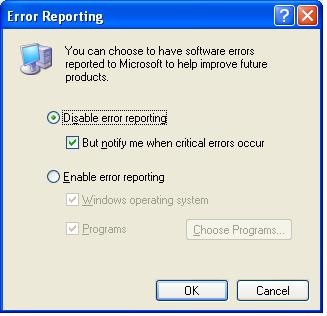
I recently experienced a problem on a test development environment where the SalesLogix web site I was working on was experiencing slower than normal performance.  I noticed this especially after frequently re-deploying the site to troubleshoot some problems.  Now in this case I had been doing my development on an Application Architect instance on a workstation and then deploying my web site to another server.  I decided to take a look on the web server and see why the site performance would be so poor.  I discovered that the DW20.exe process was maxing out the CPU and preventing the w3wp.exe from doing its thing in compiling my ASP.Net pages.  DW20.exe is a Windows process for error reporting.  See this KB for details.  This posting also points out how to disable the process by modifying registry keys.  After doing this I was still having the issue though.  I discovered that there is a way of turning off this error reporting through a Windows management interface.  All you need to do is:

  • Bring up Control Panel.
  • Open System
  • Go to the Advanced tab
  • Click the Error Reporting button.
  • Choose the Disable Error Reporting.

Disable Windows Error Reporting

  • Click OK back out.


After that the process disappeared, and the CPU was freed up for use on building my web site.  I would think it is probably a good idea to turn this feature off in a development environment, as you are likely to be producing the kind of problems the error reporting process is likely looking for.  I am not sure what point the process goes crazy but if you run into it, hopefully this post will help out.

Contact Customer FX for your CRM project
We let our expertise speak for itself - let us know how our all-star team can help on your CRM project
About the Author
Kris Halsrud
Kris Halsrud
Kris Halsrud is a Senior Analyst / Developer for Customer FX Corporation.

1 COMMENT

LEAVE A REPLY

Please enter your comment!
Please enter your name here

Infor CRM Sync for Exchange: Action Required by August 31, 2026

Using Infor CRM Sync for Exchange with Microsoft 365? Your Exchange administrator must update tenant settings by August 31, 2026 to prevent sync disruption.

[Webinar] What’s Coming Next for Infor CRM SLX and Why v10 Matters

See what’s coming next for Infor CRM SLX, including new marketing workflows, automation improvements, and reasons to consider upgrading to v10.

Disable Caching in Infor CRM SLX Web Client

In the rare case caching is causing issues in the Infor CRM SLX web client, it is possible to disable specific types of caching by making edits using Application Architect, and then deploying.

Exploring AI Options for Infor CRM v10

I've started taking a closer look at the AI capabilities built into Infor CRM v10. Over the next several posts, I'll share what I learn. From the built-in features and supported AI providers to implementation considerations, costs, and practical use cases.

Infor CRM SLX 10.0: Delegate Ownership Changes for “Everyone” Records

Learn how the new EveryoneOwnerAssignment secured action in Infor CRM SLX 10.0 allows designated users to change ownership of Everyone-owned records without requiring Administrator access.

Related Articles

Infor CRM Sync for Exchange: Action Required by August 31, 2026

Using Infor CRM Sync for Exchange with Microsoft 365? Your Exchange administrator must update tenant settings by August 31, 2026 to prevent sync disruption.

[Webinar] What’s Coming Next for Infor CRM SLX and Why v10 Matters

See what’s coming next for Infor CRM SLX, including new marketing workflows, automation improvements, and reasons to consider upgrading to v10.

Disable Caching in Infor CRM SLX Web Client

In the rare case caching is causing issues in the Infor CRM SLX web client, it is possible to disable specific types of caching by making edits using Application Architect, and then deploying.

Exploring AI Options for Infor CRM v10

I've started taking a closer look at the AI capabilities built into Infor CRM v10. Over the next several posts, I'll share what I learn. From the built-in features and supported AI providers to implementation considerations, costs, and practical use cases.

Related Videos