back to top

SalesLogix 7.5.2 web client: A Problem with Web Viewer Licenses and Completing Activities

I recently ran into a strange issue in the web client that turned out to have a logical explanation.  This explanation however, demonstrates a bug with the standard SalesLogix behavior.

The issue lies in trying to Complete an Activity or edit an existing history record when logged into the SalesLogix web client as a web viewer user.  The web client will freeze when trying to complete an activity linked to an Account or Contact. 

The web viewer license type in SalesLogix offers a low cost way of accessing the SalesLogix web client.  It is limited in what can be done, specifically it is read-only with the supposed exception of being able to schedule activities and complete activities, and insert notes and history.

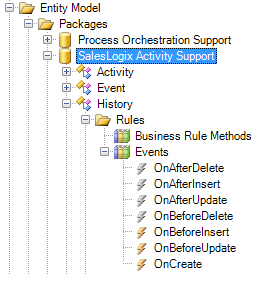
The problem with this concept is that the standard SalesLogix Activity entity model (which comprises the History entity also) contains two events:

  • History.OnBeforeInsert
  • History.OnBeforeUpdate

SalesLogix Activity Entity Model


Both of these events or compiled into the Sage.SalesLogix.Activity.dll assembly.  If we look at these events in Reflector we can see both events call a routine called UpdateAccountLastHistory.  The OnBeforeUpdate method also has a routine called UpdateContactLastHistory.

SalesLogix History.OnBeforeInsert with Reflector

SalesLogix History.OnBeforeUpdate with Reflector

What both of these methods attempt to do is update the Account and Contact tables and populate a field called LastHistoryDate with the date of the History.  Therein lies the problem.  The web viewer license can not update the Account or Contact tables because of their limitied read-only intent of these areas.

This is a problem that Sage should be able to fix rather easily by checking to see what type of user is creating/updating the History and doing some branching logic for web viewers.

This issue is present in 7.5.2 HF3.

Contact Customer FX for your CRM project
We let our expertise speak for itself - let us know how our all-star team can help on your CRM project
About the Author
Kris Halsrud
Kris Halsrud
Kris Halsrud is a Senior Analyst / Developer for Customer FX Corporation.

LEAVE A REPLY

Please enter your comment!
Please enter your name here

Infor CRM Sync for Exchange: Action Required by August 31, 2026

Using Infor CRM Sync for Exchange with Microsoft 365? Your Exchange administrator must update tenant settings by August 31, 2026 to prevent sync disruption.

[Webinar] What’s Coming Next for Infor CRM SLX and Why v10 Matters

See what’s coming next for Infor CRM SLX, including new marketing workflows, automation improvements, and reasons to consider upgrading to v10.

Disable Caching in Infor CRM SLX Web Client

In the rare case caching is causing issues in the Infor CRM SLX web client, it is possible to disable specific types of caching by making edits using Application Architect, and then deploying.

Exploring AI Options for Infor CRM v10

I've started taking a closer look at the AI capabilities built into Infor CRM v10. Over the next several posts, I'll share what I learn. From the built-in features and supported AI providers to implementation considerations, costs, and practical use cases.

Infor CRM SLX 10.0: Delegate Ownership Changes for “Everyone” Records

Learn how the new EveryoneOwnerAssignment secured action in Infor CRM SLX 10.0 allows designated users to change ownership of Everyone-owned records without requiring Administrator access.

Related Articles

Infor CRM Sync for Exchange: Action Required by August 31, 2026

Using Infor CRM Sync for Exchange with Microsoft 365? Your Exchange administrator must update tenant settings by August 31, 2026 to prevent sync disruption.

[Webinar] What’s Coming Next for Infor CRM SLX and Why v10 Matters

See what’s coming next for Infor CRM SLX, including new marketing workflows, automation improvements, and reasons to consider upgrading to v10.

Disable Caching in Infor CRM SLX Web Client

In the rare case caching is causing issues in the Infor CRM SLX web client, it is possible to disable specific types of caching by making edits using Application Architect, and then deploying.

Exploring AI Options for Infor CRM v10

I've started taking a closer look at the AI capabilities built into Infor CRM v10. Over the next several posts, I'll share what I learn. From the built-in features and supported AI providers to implementation considerations, costs, and practical use cases.

Related Videos