


Today we are looking at the seven standard reports of the Account level in Sage SalesLogix (SLX). For each I will explain the focus of the report, detail the User and Date Range condition filters, identify any issues I discover, and make any suggestions for improving the report.
Just a reminder, when running a report using user defined conditions, the “Match By” drop down provides four choices, Date Range, Group, Query, and User. When a report is entered into the SLX system by your System Administrator, they are asked to provide the default search fields for User and Date Ranges within the report. When you select either the Date Range or User choices you are going to filter by what ever is chosen when the report was added to SLX. For the purpose of this article I will refer to this as condition filters for the User and Date Range. you can read more on this topic in these two articles.
Adding Reports in Sage SalesLogix
The “Account Address Book – Sample” provides basic Account level information. The report layout is two columns so you get about 6 accounts per page. One of the issues with this report is the group is not set to stay together so you will see data for an Account start on the bottom of the first column and finish at the top of the second. I also notice that there are times when there is a lot of dead space between data sets which would limit the number of Accounts you can see per page. Condition filtering is set up to use the Account Manager (for User) and Modify Date (for Date Range).

The Account Detail Report provides Contact, Opportunity, History, and Activities for an Account. This would be a good report to use at Account review meetings. Condition filtering is set up to use the Account Manager and Modify Date. The User is provided several report parameters to setup the layout and whether to display Opportunities, Activities, and History. I am not going to provide a screen shot of this report, it is just to big. I think this report needs a lot of work but I also think with the proper changes this report could replace several others in the system. The current layout uses a lot of space. I would include the ability to filter out Contacts, and provide a way to easily filter how far back to go with History records.
BTW, Read how I fixed the Account Detail report
The Account Phone List report is a nice clean little report, it provides basic location and primary phone numbers to the user. Condition filtering is set up to use the Account Manager and Modify Date. While fixing this report I found several Database Expert issues. Read how this report was fixed.

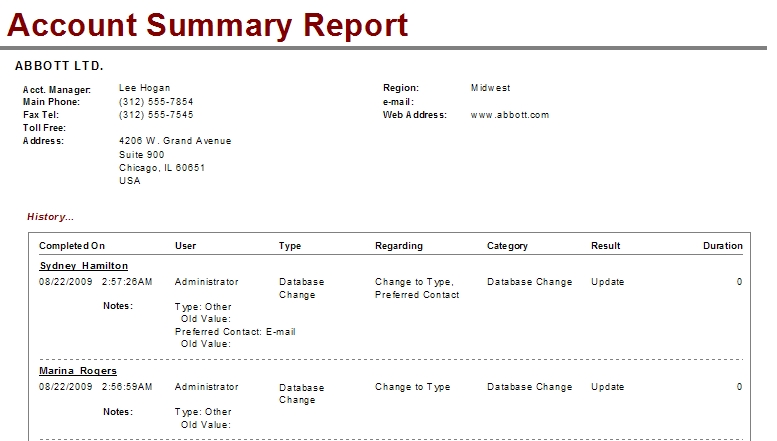
Similar to the Account Detail report, the Account Summary Report provides most of your Account information and a list of History for each Account. Condition filtering is set up to use the Account Manager and Modify Date. This is one of the reports that could be replaced very nicely with an updated Account Detail report.
The Support Account report provides simple Account details. Another candidate for removal with an updated Account Detail report. Condition filtering is set up to use the records Create User and Modify Date. Read how I adjusted this Crystal Report.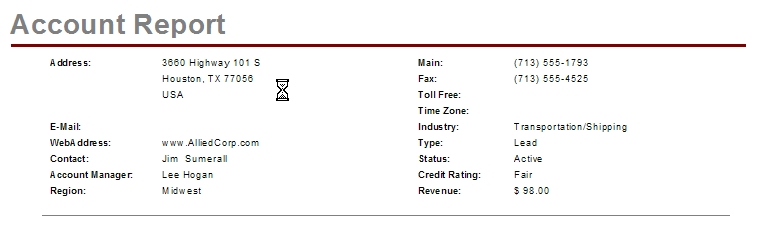
The Support Account Product List displays basic Asset information for an Account. Condition filtering is set up to use the records Account Manager and Modify Date. The report displays just the Product Name and Serial Number for each Account. The only thing I would suggest is that the report could use more detail. When did the Account purchase the product? What was the purchase price? What version of the product? Did you sell it to them or was it a legacy Asset from another vendor? The nice thing this report provides is the structure to include answer to these questions.
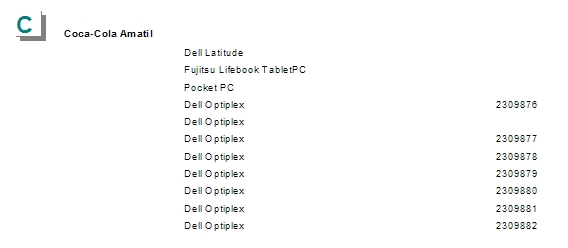
The Account Product (or Assets) area of SLX is becoming more and more popular. Knowing what Assets an Account has helps in marketing and service department efforts. If you have some time take a look at the Customer FX’s Power2Asset for the LAN client. Visit this article Power2Assets for SalesLogix Released for more information. See how this report was modified using this link.
The final report we will look at on the Account layer is called Territoryrealign. If you are looking for a list of Accounts by Account Manager then you have found it here. Condition filtering is set up to use the records Account Manager and Modify Date.
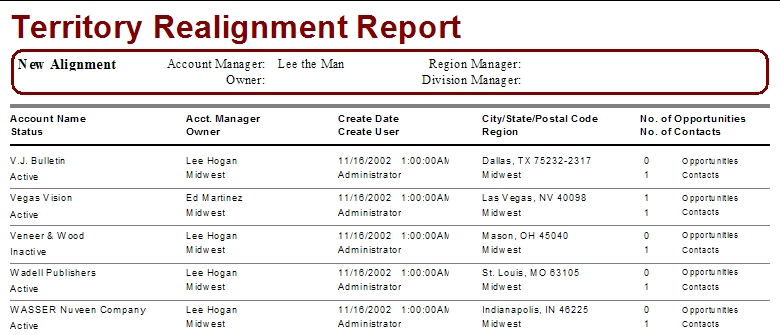

The report has some parameters established that basically just insert the value you type as a parameter into the appropriate field on the report. For this example I typed in “Lee The Man” on the Account Manager parameter. So do not count on filtering this report using any of the parameters established. What this report will do is allow you to see on paper who will own what accounts based on rules developed in a specific group.
See how I fixed the Territory Realignment report here.
Well that is it for the Account Layer of reports, hope it was as fun for you as it has been for me. If you are interested in help planning and Developing the Reports Area of SLX to work better for your organization, feel free to contact me at george.jensen@customerfx.com.


Awesome post – thanks George