


Digging right in I will tell you that a lot of the reports I create for clients are focused on user performance. Managers are saying “These are the goals I have established for my user base. Where do they stand in accomplishing them?”. One measure of your Users performance is through Activities. Questions like – Are the Users scheduling Activities?, How many? Are Activities being managed? – provide insight to your User performance.
There are only three reports that come with a standard Sage SalesLogix (SLX) implementation under the category of Activities. Those reports are Current Activities, Literature Fulfillment Details, and Literature Fulfillment Summary. The Current Activities report is the only report out of the three that provides an insight into what your Users are scheduling in the system. When running this report you will be prompted for the date range you want to report on, this filters the report based on ACTIVITY.ORIGINALDATE. The condition filters for the User and Date Range are ACTIVITY.USERID and ACTIVITY.STARTDATE. (Read up on the definition of condition filters in these posts SalesLogix Reports Area and SalesLogix Account Level Reports )
Here is a screen shot of the report.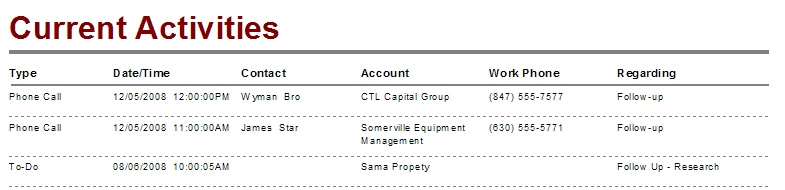
My suggested improvements for this report:
Set parameters for the Activity start date allowing the ability to change between ascending or descending.
Group by the User.
Provide the ability to include the notes for the Activity.
Add parameters to choose the Activity types you want to see.
You could also add roll-up counts for each activity type in this report.
Come read how I improved the Current Activites report!
The next two reports are used to track literature fulfillment. The Literature Fulfillment Detail report groups data by Literature Family then by Name and finally by LitReqID which defaults the list to the order in which the request was entered. The condition filters are LITERATURE.REQUSER and LITERATURE.REQDATE. What I like about the report is that it provides the who, what, and where, along with the associated cost and status of your literature inventory. 
The the only changes I would recommend to the Literature Fulfillment Detail report is that I would incorporate in the summary version discussed next.
The Literature Fulfillment Summary report groups data by Literature Family then by Name and finally by the requesting User. As with the previous report the user of the report is prompted for the status of the literature requests. The condition filters are LITERATURE.REQUSER and LITERATURE.REQDATE. I do like that the report is grouped by Family and then by Product Name but because this data is not displayed in the header the user receives row after row of redundant data differentiated only by the user who made the request.
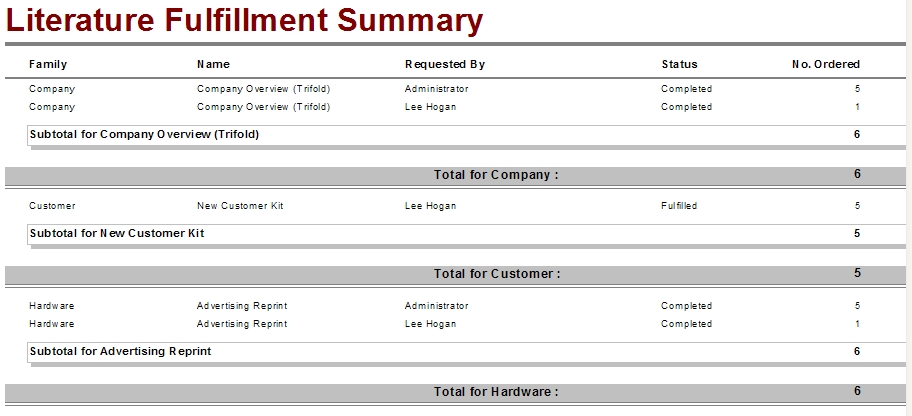
Suggested improvements for this report are
Add the Family and Name back into their group headers.
Add total Dollar amounts to the line and the groups footer.
Combine this data in with the Detail report.
I would love to hear from some users of these reports to gather your ideas on what to improve upon.
Next up is the Contact layer of standard reports.
Until then, Be well! Do good things! Most of all – Keep Smiling[:)]

