back to top

Updating the SalesLogix Work Order Crystal Report

I reviewed the SalesLogix Work Order Crystal report on the 19th of February 2009.  This report turned out to have a number of issues.   Here is what I wrote about this report in my original review.


Start Excerpt…………..
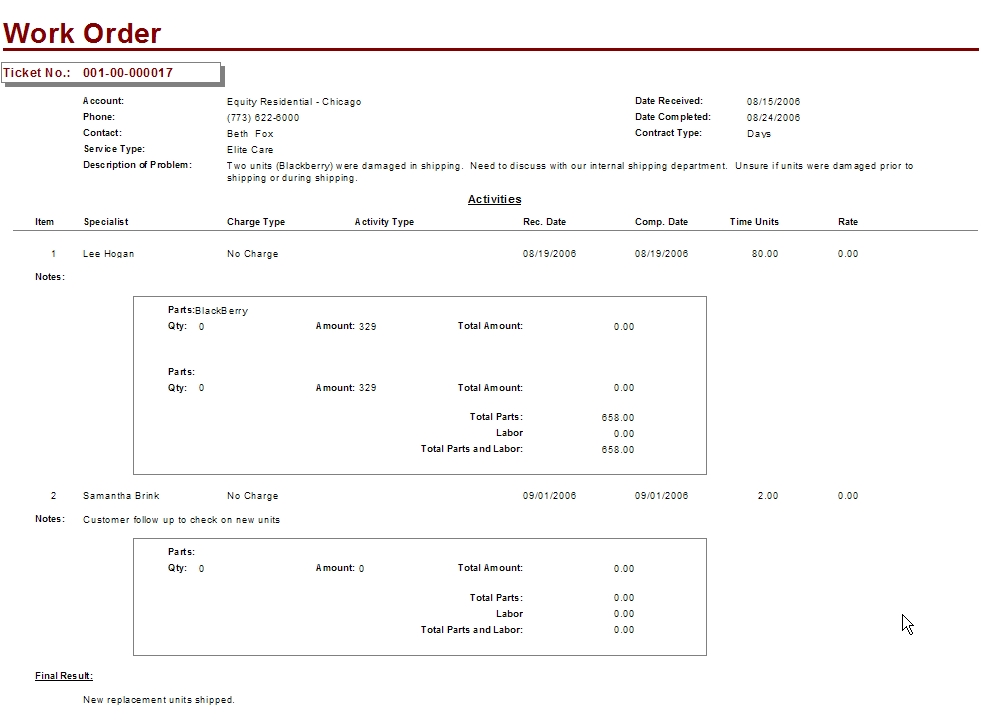


Looking at this report you see that it is out of date with the way SalesLogix currently operates today.  For example, with standard SalesLogix you can not choose a Qty when entering Activity Parts for a Ticket, this is causing an issue with the Total Amount field.  To fix this report I suggest removing both the Qty and Total Amount fields and then make some adjustments to the layout to include removing some of the white space to shorten the over all length.  Also, I think this is one of those reports where it would be nice to launch it from the Ticket main view.  Over all I like this report and with a little effort we can make this a very valuable report for all users of the system.


End Except………………


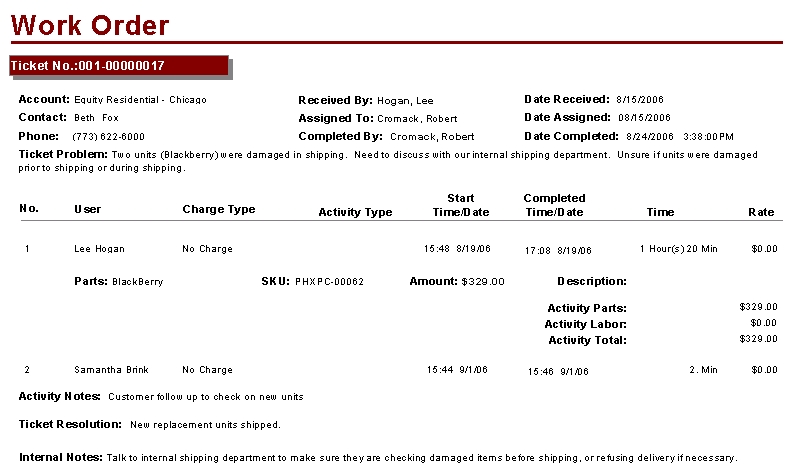
The first item of business was to remove the Activities label sitting in the center of the report.  Then I took some time to look at the tables included in the report and that is where the mess started.  So much needed to be changed I have  now lost track.  A number of tables were removed and adjustments to links were made.  Once the data was coming properly I made the following changes:


I changed the report layout from Landscape to Portrait.  This made me tighten up all of the fields and removed a lot of the white space I discussed in the initial post. 


To the Ticket Detail area I added the Received By, Assigned To, and Completed By fields. 


I fixed the TicketActivity area so the correct fields are displaying based on the Ticket area and updated the date fields to display Time and Date ands then borrowed some code from one of my previously fixed reports to display the units in hours and minutes. 


I removed the QTY field and matched the fields to how parts are currently managed in the Ticket Activity Area.   This area is now set to only display if parts are actually added to the TicketActivity. 


All note fields have been combined with their labels and set to display only if data is present.


This is the way the report looks like now.

Download a free version of this report by following this link. 


Get all of our Free SalesLogix Reports here…


Remember we have a class coming up. Crystal Report Writing for SalesLogix


I hope all is well with everyone. 

Contact Customer FX for your CRM project
We let our expertise speak for itself - let us know how our all-star team can help on your CRM project
About the Author

LEAVE A REPLY

Please enter your comment!
Please enter your name here

Infor CRM Sync for Exchange: Action Required by August 31, 2026

Using Infor CRM Sync for Exchange with Microsoft 365? Your Exchange administrator must update tenant settings by August 31, 2026 to prevent sync disruption.

[Webinar] What’s Coming Next for Infor CRM SLX and Why v10 Matters

See what’s coming next for Infor CRM SLX, including new marketing workflows, automation improvements, and reasons to consider upgrading to v10.

Disable Caching in Infor CRM SLX Web Client

In the rare case caching is causing issues in the Infor CRM SLX web client, it is possible to disable specific types of caching by making edits using Application Architect, and then deploying.

Exploring AI Options for Infor CRM v10

I've started taking a closer look at the AI capabilities built into Infor CRM v10. Over the next several posts, I'll share what I learn. From the built-in features and supported AI providers to implementation considerations, costs, and practical use cases.

Infor CRM SLX 10.0: Delegate Ownership Changes for “Everyone” Records

Learn how the new EveryoneOwnerAssignment secured action in Infor CRM SLX 10.0 allows designated users to change ownership of Everyone-owned records without requiring Administrator access.

Related Articles

Infor CRM Sync for Exchange: Action Required by August 31, 2026

Using Infor CRM Sync for Exchange with Microsoft 365? Your Exchange administrator must update tenant settings by August 31, 2026 to prevent sync disruption.

[Webinar] What’s Coming Next for Infor CRM SLX and Why v10 Matters

See what’s coming next for Infor CRM SLX, including new marketing workflows, automation improvements, and reasons to consider upgrading to v10.

Disable Caching in Infor CRM SLX Web Client

In the rare case caching is causing issues in the Infor CRM SLX web client, it is possible to disable specific types of caching by making edits using Application Architect, and then deploying.

Exploring AI Options for Infor CRM v10

I've started taking a closer look at the AI capabilities built into Infor CRM v10. Over the next several posts, I'll share what I learn. From the built-in features and supported AI providers to implementation considerations, costs, and practical use cases.

Related Videos