


During a recent SalesLogix customization, we realized that editing an account address does not cause the unsaved data prompt to be displayed. If someone were to modify an account address and neglected to save, changes would be lost without the user being the wiser. Initially, we just added a Save business rule to the OnChangeAction of the Address control, but this wouldn’t account for any related contact records that would also need to have their addresses updated.
Since the edit address functionality contains both on “OK” and “Cancel” button, we reasoned that it would make sense to have OK comit the change to the database, bypassing the unsaved data prompt all together. To do this, I basically duplicated the functionailty present on the “Save” button on Account Detail onto the OnChangeAction event of the Address control visible on the AccountDetails form. This forces a user to explicitly comit or discard any account address changes, as well as allowing functionality to update related contacts.
The type of Action Item we need to add is a Validation Business Rule. The Validation Business Rule will evaluate any contacts for the account, checking to see if any of those contacts are configured with the same address as the account. If so, the user needs to be presented with a prompt asking if related contacts’ addresses should be updated as well. This is done using the UpdateAccountOptions smartpart.
When you edit the OnChangeAction of the address control on the form, you are presented with the Action item designer:
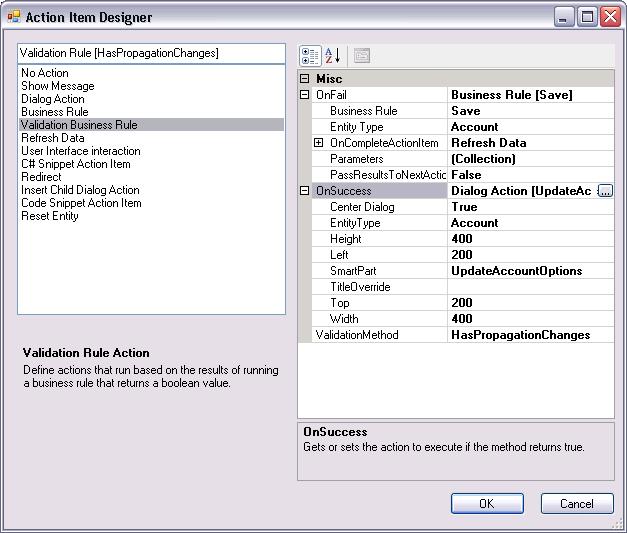
After selecting ValidationBusinessRule in the list, you need to configure the OnFail and OnSuccess events of that action item. The OnFail event fires if there are no related contacts with the same address. Simply set the EntityType to Account, and the select the Save business rule. The modified Address record is saved for the Account record.
The OnSuccess event contains parameters for the user prompt displayed if updatable contacts are found. If so, the user is asked if they want to update contacts as well.
The For the OnSuccess event, Set the EntityType to Account, and add a new Dialog action:
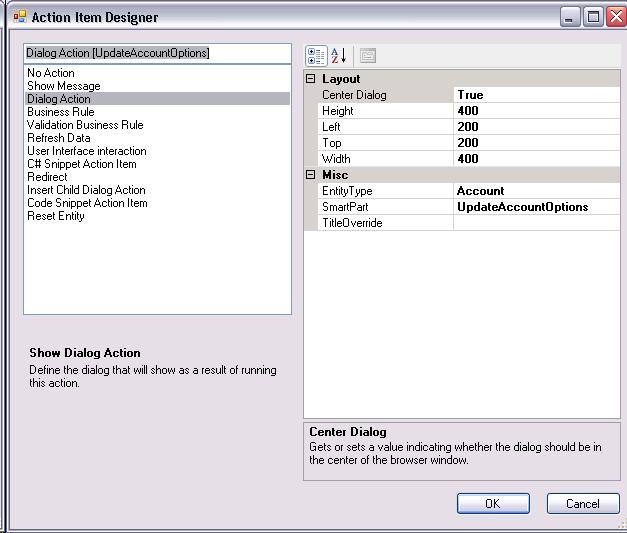
EntityType should again be account. UpdateAccountOptions may not be available on the dropdown list of SmartParts, but typing in the value “UpdateAccountOptions” will work as well. Click OK to close the Dialog Action, which will fill in the smartpart value for the Validation Business Rule.
You can tweak the height and width properties in the Validation Business Rule to adjust the size of the prompt. Finally, the ValidationMethod should be set to “HasPropagationChanges”.
That’s all there is to it! Re-build the SalesLogix web platform and re–deploy, and you should never have to worry about losing account address changes again.
Thanks!

