back to top

SalesLogix 7.5.1 Web Client – Filters

In Brianna’s post she mentioned how there is new functionality in SalesLogix 7.5.1 called filters. I wanted to explain what exactly this change is and how it impacts the use of SalesLogix.


Prior to 7.5.1 the group filters that were available on the filter pane in the group view were dynamically created based upon the columns contained in the current group.  Each column created a filter automatically.  Inside each filter was a distinct list of the values in that field.  For instance, if I created an Account group that contained two columns “Account” and “Type”, when I view that group I would see in the Filters section to the right, two filter options for “Account and “Type”:
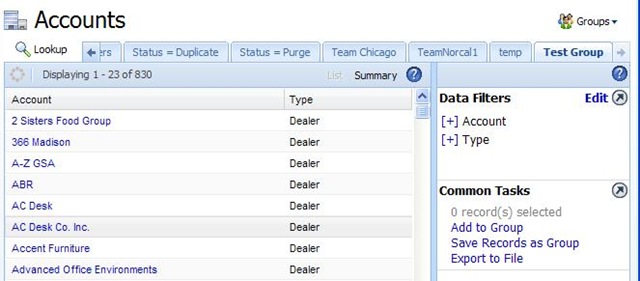

SalesLogix 7.5 Web Filters


If we expanded out any of the filters, we would see a distinct list of the values:
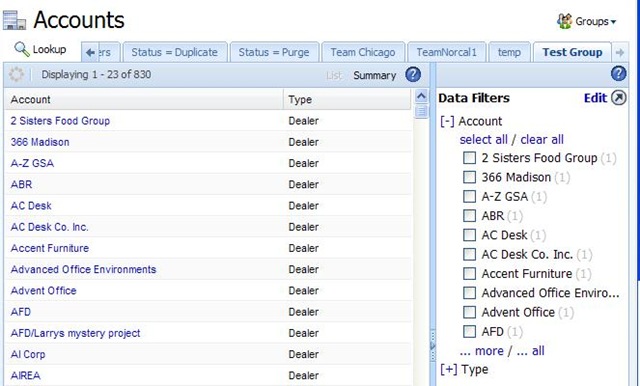

SalesLogix 7.5 Web Filters Expanded


I would imagine, that building this kind of dynamic listing was a little processor intensive and probably part of the reason why SalesLogix 7.5.1 has changed this.


New in SalesLogix 7.5.1 is the ability to define Filters at the entity level:


SalesLogix 7.5.1 Entity Filters


These defined Filters are now static on all groups in 7.5.1.  Meaning that regardless of which columns are in your group you see the same Filters:


SalesLogix 7.5.1 Filters in groups


Some of These filters have a property called “Ranges”, which is shown in the screen shot two images up.  Inside this ranges parameter you define in what way the Filter filed should be searchable.  We can see the previous screen that the Account Filter has a set of Ranges for A. B. C. D. etc.  If we expand out the filter now next to the group, we can see how these correlate to the GUI.


SalesLogix 7.5.1 Filters in groups expanded


So there you have it.  Filtering has changed in 7.5.1.  In some ways it can be argued that it is better since you can define ways that all groups should be searched.  You have now lost the ability to let the user build a group, and utilize the auto-filter building based on the columns in the group.  This was nice functionality to have- in 7.5.1 you must define all the filters that users may need to use.  Potentially you might have to define a lot of filters that serve no purpose for most groups, but if one group has to have it, all groups do.


I will be blogging more on these filters shortly.

Contact Customer FX for your CRM project
We let our expertise speak for itself - let us know how our all-star team can help on your CRM project
About the Author
Kris Halsrud
Kris Halsrud
Kris Halsrud is a Senior Analyst / Developer for Customer FX Corporation.

1 COMMENT

  1. Joe, do other Opportunity groups work? Is the account manager column part of the group layout?

    The filters are constructed and operate client side so maybe there is a javascript error occurring?

LEAVE A REPLY

Please enter your comment!
Please enter your name here

Infor CRM Sync for Exchange: Action Required by August 31, 2026

Using Infor CRM Sync for Exchange with Microsoft 365? Your Exchange administrator must update tenant settings by August 31, 2026 to prevent sync disruption.

[Webinar] What’s Coming Next for Infor CRM SLX and Why v10 Matters

See what’s coming next for Infor CRM SLX, including new marketing workflows, automation improvements, and reasons to consider upgrading to v10.

Disable Caching in Infor CRM SLX Web Client

In the rare case caching is causing issues in the Infor CRM SLX web client, it is possible to disable specific types of caching by making edits using Application Architect, and then deploying.

Exploring AI Options for Infor CRM v10

I've started taking a closer look at the AI capabilities built into Infor CRM v10. Over the next several posts, I'll share what I learn. From the built-in features and supported AI providers to implementation considerations, costs, and practical use cases.

Infor CRM SLX 10.0: Delegate Ownership Changes for “Everyone” Records

Learn how the new EveryoneOwnerAssignment secured action in Infor CRM SLX 10.0 allows designated users to change ownership of Everyone-owned records without requiring Administrator access.

Related Articles

Infor CRM Sync for Exchange: Action Required by August 31, 2026

Using Infor CRM Sync for Exchange with Microsoft 365? Your Exchange administrator must update tenant settings by August 31, 2026 to prevent sync disruption.

[Webinar] What’s Coming Next for Infor CRM SLX and Why v10 Matters

See what’s coming next for Infor CRM SLX, including new marketing workflows, automation improvements, and reasons to consider upgrading to v10.

Disable Caching in Infor CRM SLX Web Client

In the rare case caching is causing issues in the Infor CRM SLX web client, it is possible to disable specific types of caching by making edits using Application Architect, and then deploying.

Exploring AI Options for Infor CRM v10

I've started taking a closer look at the AI capabilities built into Infor CRM v10. Over the next several posts, I'll share what I learn. From the built-in features and supported AI providers to implementation considerations, costs, and practical use cases.

Related Videos