back to top

Setting the Default Sort for a DataGrid in SalesLogix Web

SalesLogix Web comes with it’s own set of controls to be used on QuickForms. These controls are still in their infancy and will likely grow over time, but for now, there are some things missing that might be perceived as limitations. It’s helpful to know more about what is under the hood of these OOTB QuickForm controls so you can easily work around limitations and push the controls to behave the way you want them to work.

The DataGrid control in the SalesLogix Web architecture is a very simple control. There’s not a lot of “extras” to it at all. One common thing that might be desired with the DataGrid is to specify an initial sort order for it’s data. Looking at the properties for the grid in the QuickForms editor, you won’t see a way to specify this. However, let’s take a look under the hood at the grid control.

The SalesLogix QuickForm controls are located in the assembly named “Sage.SalesLogix.Web.Controls.dll”. If you look at a SmartPart with a grid on it you’ll notice that the grid control is actually called “SlxGridView“. If we open that DLL in reflector and navigate to located SlxGridView we can see the following:
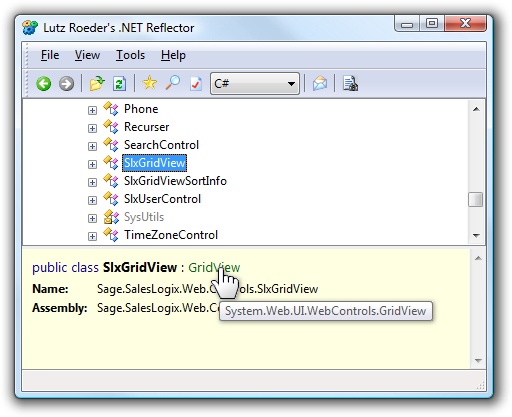
Well cool. It inherits from the standard ASP.NET GridView control. We can take a look at the MSDN docs for the GridView control and see all that it contains. Since the SlxGridView control inherits from System.Web.UI.WebControls.GridView, it has everything that we see listed there, including a Sort method.  

We can take what we’ve learned there and just add some code to a LoadAction for our QuickForm to set the default/initial sort order for the grid. The Sort method takes two parameters. The field or property name to sort by (you can specify multiple properties/fields here, delimited by a comma) and the second parameter indicates the sort direction. I added some code to the LoadAction of the AccountTickets QuickForm to sort the ticket’s in descending order by the ReceivedDate property of the Ticket entities listed in the grid.

grdAccountTickets.Sort("ReceivedDate", SortDirection.Descending);

That is it. While the SalesLogix DataGrid control itself didn’t have anything built in for specifying a sort programatically, knowing where to look makes this an easy task because we get to see what else it has from it’s base type.

Contact Customer FX for your CRM project
We let our expertise speak for itself - let us know how our all-star team can help on your CRM project
About the Author
Ryan Farley
Ryan Farleyhttps://customerfx.com/article/author/ryanfarley/
Ryan Farley is the Director of Development for Customer FX and creator of slxdeveloper.com. He's been blogging regularly about SalesLogix, now Infor CRM, since 2001 and believes in sharing with the community. His new passion for CRM is Creatio, formerly bpm'online. He loves C#, Javascript, web development, open source, and Linux. He also loves his hobby as an amateur filmmaker.

1 COMMENT

  1. Hi All, I’m just trying to sort a datagrid by a couple of properties

    grid.Sort(“col1,col2”, SortDirection.Descending);

    delimited by commas, but I’m getting this error:

    DataBinding: ‘Sage.Platform.ComponentModel.ComponentView’ does not contain a property with the name ‘Col1,Col2’.

    It works fine using only one property.

    Any ideas? thanks in advance

LEAVE A REPLY

Please enter your comment!
Please enter your name here

Infor CRM Sync for Exchange: Action Required by August 31, 2026

Using Infor CRM Sync for Exchange with Microsoft 365? Your Exchange administrator must update tenant settings by August 31, 2026 to prevent sync disruption.

[Webinar] What’s Coming Next for Infor CRM SLX and Why v10 Matters

See what’s coming next for Infor CRM SLX, including new marketing workflows, automation improvements, and reasons to consider upgrading to v10.

Disable Caching in Infor CRM SLX Web Client

In the rare case caching is causing issues in the Infor CRM SLX web client, it is possible to disable specific types of caching by making edits using Application Architect, and then deploying.

Exploring AI Options for Infor CRM v10

I've started taking a closer look at the AI capabilities built into Infor CRM v10. Over the next several posts, I'll share what I learn. From the built-in features and supported AI providers to implementation considerations, costs, and practical use cases.

Infor CRM SLX 10.0: Delegate Ownership Changes for “Everyone” Records

Learn how the new EveryoneOwnerAssignment secured action in Infor CRM SLX 10.0 allows designated users to change ownership of Everyone-owned records without requiring Administrator access.

Related Articles

Infor CRM Sync for Exchange: Action Required by August 31, 2026

Using Infor CRM Sync for Exchange with Microsoft 365? Your Exchange administrator must update tenant settings by August 31, 2026 to prevent sync disruption.

[Webinar] What’s Coming Next for Infor CRM SLX and Why v10 Matters

See what’s coming next for Infor CRM SLX, including new marketing workflows, automation improvements, and reasons to consider upgrading to v10.

Disable Caching in Infor CRM SLX Web Client

In the rare case caching is causing issues in the Infor CRM SLX web client, it is possible to disable specific types of caching by making edits using Application Architect, and then deploying.

Exploring AI Options for Infor CRM v10

I've started taking a closer look at the AI capabilities built into Infor CRM v10. Over the next several posts, I'll share what I learn. From the built-in features and supported AI providers to implementation considerations, costs, and practical use cases.

Related Videos