


Customer FX Infor CRM SLX Field Notes
We recently had a client upgrade from an “upgrade safe” version on Saleslogix to a newer version. With the new “upgrade safe” architecture, upgrades are easier- as most things do carry-forward though an upgrade. However, sometimes these carry-forwards cause problems, as this post describes.
After upgrading, the client was receiving error in the event logs with details like this:
Unable to locate type information ‘Sage.SalesLogix.Activity.BusinessRules.HistoryRules, Sage.SalesLogix.Activity’ for business rule ‘History.OnAfterInsert’
Sage.Platform.DynamicMethod.DynamicMethodException: Unable to locate type information ‘Sage.SalesLogix.Activity.BusinessRules.HistoryRules, Sage.SalesLogix.Activity’ for business rule ‘History.OnAfterInsert’
After troubleshooting, the cause was determined: Before Saleslogix version 9.4, the History entity had a standard action on the OnAfterInsert event. The primary step for this event is wired up to a method within the Sage.Saleslogix.Activity.BusinessRules.dll. That method was “OnAftereInsert” as shown here:
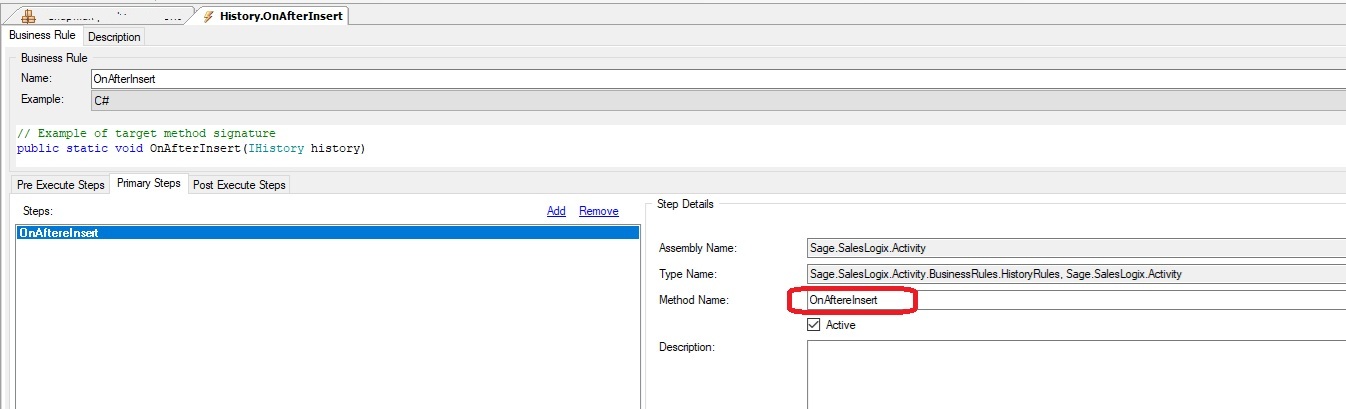
In 9.4 Infor corrected this method name in the assembly to be properly spelled as “OnAfterInsert” without the extraneous e.
In the case of this client, they had modified this History OnAfterInsert event. When you modify such an event you end up with a custom OnAfterInsert.method.xml file in the SLXCoreCustom\Entity Model\SalesLogix Activity Support\History folder within the “custom” Virtual File System storage. That xml file defines the entire event, including pre-Execute, Primary, and post-Execute steps. Since this file exists, it properly “survived” the upgrade and was still in place within the upgraded system. The problem is that there is no longer a method called “OnAftereInsert” in the upgraded Sage.Saleslogix.Activity.BusinessRules.dll assembly. This is what was causing the errors that were showing in the client’s event logs.
The fix for this was to remove the incorrect primary step from the custom entity event definition and re-add the OnAfterInsert primary step, this time browsing out to the correct “OnAfterInsert” method in the upgraded Sage.Saleslogix.Activity.BusinessRules.dll assembly. After then re-building the web platform and deploying the applications the problem was eliminated.
About Customer FX Infor CRM SLX Field Notes
Since 1993, Customer FX has helped organizations implement, support, customize, and upgrade Infor CRM SLX environments. This series shares real-world troubleshooting discoveries, upgrade insights, and technical best practices from production CRM environments.
Need help with your Infor CRM SLX environment? Contact Customer FX.

